TechVibeSpot earns a commission if you buy through links on this page. That never changes a verdict.
The Aqara U400 is the first smart lock most people will ever own that opens the door before their hand reaches the handle. It uses ultra-wideband (UWB) radio, the same precise-location chip behind Apple’s AirTag, to sense that you, specifically, are walking up to your own front door from the outside. No tapping, no fingerprint, no phone out of your pocket. At $269.99, it undercuts its only direct UWB rival by $130. This review breaks down how the hands-free trick works, what hardware you need, where the lock falls short, and whether the U400 or a cheaper alternative belongs on your door.
How we assess: this review is based on manufacturer specs, official documentation, and verified owner reports, not hands-on testing.
Is the Aqara U400 worth buying? Yes, for Apple households. The U400 delivers reliable UWB hands-free unlocking, Apple Home Key, a fingerprint reader, and Matter over Thread for $269.99, which is $130 less than the Schlage Sense Pro. Android-first homes should skip it, because hands-free unlock and Home Key only work with iPhone and Apple Watch.
Quick Picks: Three Locks, Three Budgets
Best overall (Apple homes): Aqara U400 — about $270
The one to get if you own an iPhone 11 or newer and a HomePod or Apple TV. Hands-free UWB entry, fingerprint, keypad, and a real key backup.
Check price on Amazon →
Best value Apple Home Key lock: Aqara U100 — about $130-$190
Same fingerprint-plus-Home-Key formula without UWB. The smart buy if hands-free entry is a nice-to-have, not a must-have.
Check price on Amazon →
Best budget pick: TEEHO TE001 — about $60
No app, no hub, no subscription. A keypad deadbolt that simply works, for the price of a dinner out. Ideal for rentals and back doors.
Check price on Amazon →
Key Takeaways
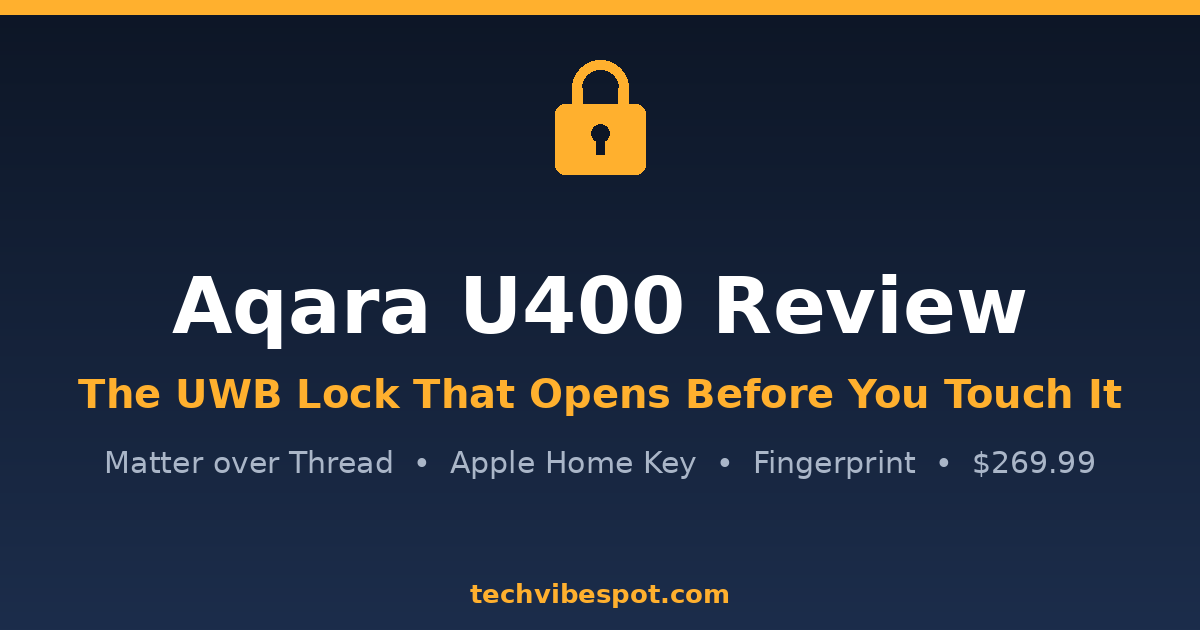
- The Aqara U400 costs $269.99 in black or silver and replaces your entire single-cylinder deadbolt, not just the thumb-turn.
- UWB hands-free unlock requires an iPhone 11 or newer on iOS 18.5+ (or Apple Watch Series 6+ on watchOS 11.5+) plus a Thread-enabled Apple home hub.
- You also get a fingerprint reader (50 prints, 0.3-second response), a backlit keypad (75 PIN codes), NFC, Apple Home Key, and two physical backup keys.
- The rechargeable battery is rated for up to 6 months per charge and tops up over USB-C without removing the lock from the door.
- HomeKit News scored it 8.7/10 and Tom’s Guide recommends it; the main complaints are bulk, a battery that can fall short of 6 months, and the Thread hub requirement.
- The Schlage Sense Pro offers similar UWB unlocking for $399, which makes the U400 the price-performance leader in hands-free locks right now.
What Is the Aqara U400 and What Makes It Different?
The Aqara U400 is a full-replacement smart deadbolt that shipped in early 2026 as one of the world’s first Apple-compatible UWB smart locks. Where earlier Aqara locks like the U100 and U50 relied on Bluetooth to talk to your phone, the U400 adds an ultra-wideband radio that measures your exact distance and direction from the door to within centimeters. That single addition changes how the lock feels in daily use: instead of pressing your thumb to a sensor or holding your phone against a reader, you just walk up and the bolt retracts.
The rest of the hardware covers every fallback you could ask for. There is a fingerprint reader rated for 50 prints with a claimed 98.6% recognition accuracy and 0.3-second response, a backlit keypad that stores up to 75 PIN codes of 6 to 10 digits, an NFC reader for Aqara’s key cards, Apple Home Key support, and two old-fashioned metal keys in the box. Connectivity runs over Matter via Thread, so the U400 works with Apple Home, Amazon Alexa, Google Home, Samsung SmartThings, and Home Assistant, according to Aqara’s official product page. The exterior assembly carries an IP65 weather rating, and the lock is ANSI/BHMA certified at Grade 3, the standard residential tier.
One detail that separates the U400 from Wi-Fi locks like the Kwikset Halo line: there is no Wi-Fi radio at all. Remote access rides on Thread through a border router. That means no Wi-Fi disconnection headaches, and it also means the lock keeps working locally (fingerprint, PIN, UWB, key) even when your internet is down. If that architecture appeals to you, our guide to smart locks that work without Wi-Fi covers the whole category.
How Does UWB Hands-Free Unlocking Actually Work?
UWB unlocking works by exchanging short radio pulses between the lock and your iPhone to calculate your precise position, not just your rough proximity. Bluetooth-based auto-unlock, the kind August popularized, estimates distance from signal strength, which walls, pockets, and rain jackets all distort. UWB time-of-flight measurement is accurate to centimeters and, critically, directional: the U400 knows whether you are approaching from outside or standing inside your own hallway, so it will not helpfully unlock the door while you walk past it to the kitchen, as HomeKit News explains in its review.
In practice, reviewers describe the experience the same way. Derek Seaman, who ran the U400 on his front door for five months, writes that “the UWB light flashes green and the door unlocks a split second before my hand even touches the handle.” 9to5Mac’s reviewer reports the door unlocking with the iPhone still in a pocket or an Apple Watch on the wrist. Tom’s Guide found hands-free unlocking “worked quite well” and triggered “consistently almost every time,” with occasional short delays when relying on an Apple Watch alone. HomeKit News calls UWB “a completely different experience compared to Bluetooth” and rated the lock 8.7/10 overall.
Apple Home exposes an Approach Direction setting (front, left, or right) that tunes the detection cone to your porch layout, which matters if your door sits at the end of a walkway that runs parallel to the wall. And because UWB rides alongside Home Key, you keep the tap-to-unlock NFC Express Mode fallback: hold your iPhone or Watch to the reader and the door opens even if the phone battery is in reserve mode, no Face ID required.
What Do You Need for Hands-Free Unlock to Work?
You need three things for UWB unlocking: a compatible iPhone or Apple Watch, current software, and a Thread-enabled Apple home hub. Per Aqara’s spec sheet, that means an iPhone 11 or newer (the SE models and iPhone 16e are excluded because they lack the U-series chip) running iOS 18.5 or later, or an Apple Watch Series 6 or newer (again excluding SE) on watchOS 11.5 or later. The hub requirement means a HomePod mini, HomePod (2nd gen), or a Thread-capable Apple TV 4K sitting within Thread range of the door.
That hub does double duty. It acts as the Thread border router that gives the U400 remote access, and it anchors the Apple Home automations that make the lock more than a fancy bolt. Without one, the U400 still functions as a fingerprint-keypad-key lock over Bluetooth, but you lose hands-free UWB entry and away-from-home control, which is most of what you are paying for. Tom’s Guide flags this dependency as a genuine con for buyers outside the Apple ecosystem, and it is the right call: budget another $99 for a HomePod mini if you do not already own a hub.
Android users get a narrower deal. Through Matter, the U400 pairs with Google Home, Alexa, and SmartThings for lock/unlock control and status, and the Aqara app on Android manages fingerprints and codes. But UWB hands-free unlock and Home Key are Apple-only features today. An Android household will be happier with a Wi-Fi keypad lock; our best smart locks under $100 roundup has several that cost a third as much.
How Long Does the Aqara U400 Battery Last?
Aqara rates the U400’s removable rechargeable lithium battery at up to 6 months per charge, and long-term owner reports land close to that number. Derek Seaman’s five-month review reports roughly six months of real-world life per charge cycle with UWB active. Tom’s Guide was less impressed, noting battery life “falls short of expectations” during its review period, a gap that likely comes down to traffic: UWB ranging, Thread radio, and a busy front door all draw power. Treat 4 to 6 months as the realistic window.
Charging is where the U400 is smarter than most rivals. The interior assembly has a USB-C port, so you can top the battery up without removing anything from the door; a power bank and a cable will do it. The lock warns at 20% remaining, and in a genuine emergency the exterior side can be powered over USB-C from a power bank to get you in. The $299.95 Deluxe version sold through Apple includes a second battery so you can hot-swap instead of waiting on a charge. The one supply-chain wrinkle, flagged by HomeKit News: standalone spare batteries were not yet available to purchase separately at review time, so the Deluxe bundle is the only way to get a second cell.
Compare that to the AA-powered competition. A Schlage Encode eats four AAs every few months; the U400 asks you to plug in a cable twice a year. It is a small thing until the third time you buy an 8-pack of batteries.
Is the Aqara U400 Secure?
The U400 is certified to ANSI/BHMA Grade 3, the standard residential security tier, and its exterior assembly carries an IP65 rating against dust and water jets. Grade 3 is worth being honest about: it is the entry certification level, the same tier as most sub-$100 keypad deadbolts, and below the Grade 1 hardware on locks like the Schlage Encode Plus. For a $270 lock, Grade 2 would have been the stronger statement. The bolt itself is a standard single-cylinder deadbolt replacement, and 9to5Mac noted it throws with more force than some competing locks on older, slightly misaligned doors.
On the digital side, the U400’s no-Wi-Fi architecture shrinks the attack surface. Credentials and fingerprints are stored locally on the lock, unlock events ride Thread’s encrypted mesh, and Matter handles cross-ecosystem authentication. PIN codes support 6 to 10 digits, and the keypad supports one-time and scheduled passwords for guests, cleaners, and dog walkers through the Aqara app. You also keep two physical keys as a fail-safe, which we consider non-negotiable on any front door; our guide to the best smart locks with physical key backup explains why an all-electronic lock is a bad bet on a primary entrance.
One managerial quirk to know: Matter caps shared users at 20, while the Aqara app supports 100, so large households or rental hosts should manage credentials in Aqara’s app rather than through Apple Home, per Tom’s Guide’s review.
Aqara U400 vs U300 vs U100 vs Schlage Sense Pro: Which Should You Buy?
The U400 wins this comparison for most Apple-home buyers because it is the cheapest lock with UWB hands-free entry, but each alternative has a legitimate case. The U300 is a handle-style lever lock for doors without a separate deadbolt. The U100 delivers Home Key and fingerprint entry for roughly half the price. The Schlage Sense Pro matches the U400’s UWB trick, adds Wi-Fi and the new Aliro standard, and charges $399 for the privilege, per HomeKit News.
| Lock | Price | Connectivity | Key backup | Best for | |
|---|---|---|---|---|---|
| Aqara U400 | $269.99 | Matter over Thread, UWB, NFC, Bluetooth | Yes (2 keys) | Apple homes that want hands-free entry | Check price |
| Aqara U300 | ~$230 | Matter over Thread, NFC, Bluetooth | Yes | Doors with a lever handle instead of a deadbolt | Check price |
| Aqara U100 | ~$130-$190 | Bluetooth + Home Key (Wi-Fi via hub) | Yes | Home Key on a budget, no UWB needed | Check price |
| Schlage Sense Pro | $399 | Wi-Fi, Matter over Thread, UWB, Aliro | Yes | UWB plus built-in Wi-Fi, bigger budget | Check price |
Two decision rules cover most buyers. If your door has a single-cylinder deadbolt and your household runs on iPhones, get the U400; the $130 saved versus the Sense Pro pays for the HomePod mini the system wants anyway. If you cannot justify $270 for a lock, get the U100 while it is discounted, accept tap-to-unlock instead of walk-up unlocking, and revisit UWB in two years when the category matures. For a wider field, including retrofit options that keep your existing keys, see our best UWB smart locks of 2026 roundup.
Does the Aqara U400 Work with Alexa, Google Home, and Home Assistant?
Yes. Matter over Thread gives the U400 native support in Apple Home, Amazon Alexa, Google Home, Samsung SmartThings, and Home Assistant, and every one of those platforms can lock, unlock, and read state. The caveat repeated throughout this review applies here too: the marquee features are Apple-exclusive. Alexa and Google homes get a very good fingerprint-and-keypad deadbolt with app control; they do not get UWB walk-up unlocking or Home Key.
Home Assistant deserves a special mention because the integration is unusually complete. Derek Seaman’s write-up describes pairing over Matter with battery diagnostics and user management exposed, and custom automations tying lock state to a nearby light switch’s LED. Aqara’s own app adds the deep controls: per-user schedules, one-time codes, auto-lock timing from 3 seconds up, Do Not Disturb mode, and automation triggers for Not Fully Locked and Low Battery events. Fingerprint enrollment does require the Aqara app at setup, one of several small app-bounces 9to5Mac noted, but day-to-day use afterward never touches it.
If your smart home centers on Alexa rather than Apple, better-fitting locks exist for less money; our guide to smart locks for Alexa walks through the strongest options.
How Hard Is the Aqara U400 to Install?
Installation is a standard full-deadbolt swap that owners report finishing in under 30 minutes with a Phillips screwdriver. The U400 replaces both the exterior and interior assemblies of a single-cylinder deadbolt, so it is more involved than retrofit locks like Aqara’s own U200, which leave the outside hardware alone. The box includes a cutting template for doors that need a fresh or enlarged bore, plus a removable collar adapter for smaller bore holes.
Two friction points come up in owner and reviewer reports. First, the connecting cable between the two assemblies is thin, and 9to5Mac cautions that the wires feel fragile while you feed them through the door, so route them gently. Second, Derek Seaman notes that holding the interior assembly perfectly vertical while tightening its two mounting screws is fiddly; a strip of painter’s tape to hold it in place solves it. After the hardware is on, pairing is quick: add the lock to the Aqara app or straight to Apple Home with the single Matter QR code, and fingerprints can even be enrolled from the keypad itself with a tap sequence, no phone required.
The U400 fits standard US single-cylinder deadbolt preps. If your door uses a multipoint mortise lock, a glass insert near the thumb-turn, or a Euro cylinder, it is the wrong product, full stop.
What Do Long-Term Owners and Reviewers Actually Say?
Across four in-depth reviews, the consensus is unusually consistent: the UWB feature delivers, and the complaints are peripheral. HomeKit News scored the U400 8.7/10, praising the unlock options and design, with its lone hardware gripe being that spare batteries cannot yet be bought separately. Tom’s Guide recommends it as “the smart lock to beat” for hands-free entry, while docking it for bulk, battery life under the 6-month claim, and the Thread hub requirement. Derek Seaman, five months in, calls it “the perfect smart lock for me,” with his only defect being a faulty speaker on an early Deluxe unit that Aqara replaced. 9to5Mac highlights that it throws its bolt with more authority than competing locks on older doors.
Recurring owner-reported niggles, for balance: auto-lock occasionally fires late, so set a time-based backup auto-lock; the exterior escutcheon is chunkier than a plain deadbolt, which traditionalists notice; and Apple Watch-only households see slightly slower UWB response than iPhone carriers. Nobody in the sources above reported lockouts, false unlocks from indoors, or weather failures through winter use, and the market agreed: the U400 hit the #1 spot on Amazon’s smart lock new releases shortly after launch, per Aqara’s own forum announcement.
Buy This If / Skip This If
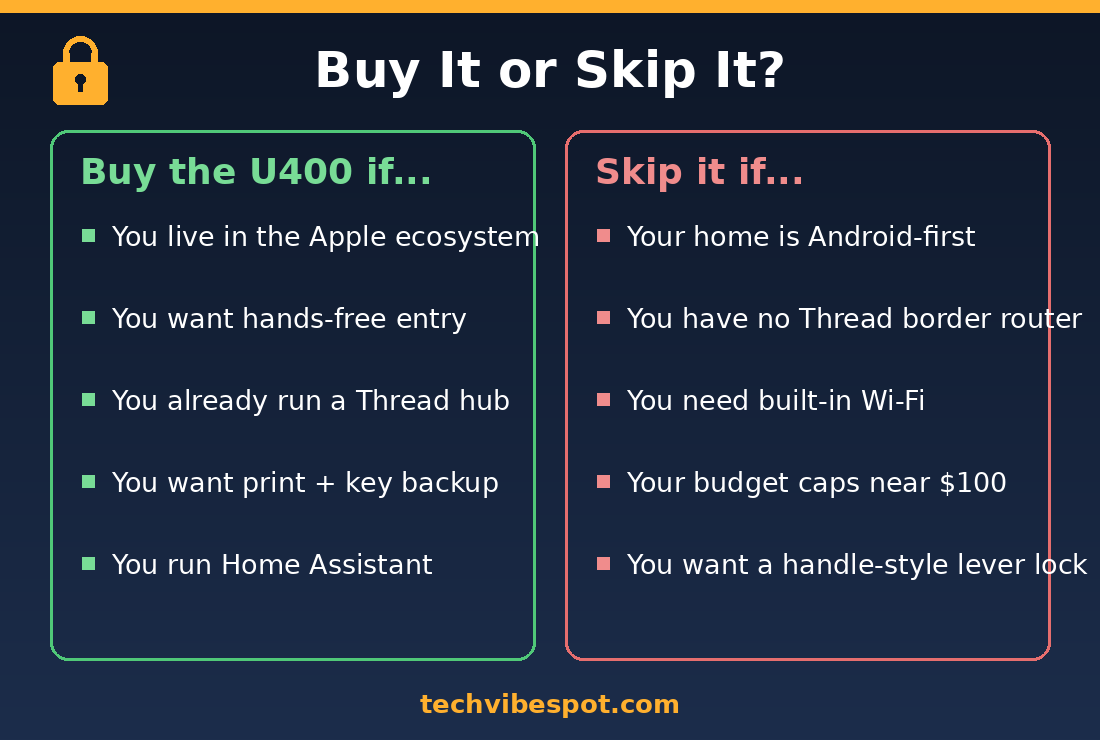
Buy the Aqara U400 if: your household carries iPhone 11-or-newer phones; you already own (or will add) a HomePod mini, HomePod 2, or Thread-capable Apple TV 4K; you want walk-up hands-free entry with fingerprint, keypad, and physical key fallbacks; you run Home Assistant or a Matter-based multi-platform home; or you are tired of replacing AA batteries and prefer USB-C recharging.
Skip the Aqara U400 if: your home is Android-first (get a Wi-Fi keypad lock instead); you have no Thread border router and no interest in buying one; your door lacks a single-cylinder deadbolt (the Aqara U300 handle lock fits lever doors); you need Grade 1 or Grade 2 certified hardware for insurance reasons; or your budget stops near $100, where the TEEHO TE001 covers keyless entry basics for about $60.
Verdict: Is the Aqara U400 Worth $269.99?
Yes. The Aqara U400 is the best smart lock you can put on an Apple household’s door in 2026, and it is not a close call at this price. UWB hands-free unlocking is the first genuine step forward in smart-lock convenience since the keypad, every fallback method is on board, the battery recharges over USB-C, and Matter over Thread keeps it working across every major platform. The Schlage Sense Pro matches the headline feature for $130 more; the U400’s Grade 3 rating and missing Wi-Fi radio are the honest trade-offs for the savings. Watch for sale pricing too: the U400 has already dipped to around $229 during Amazon sale events, per Slickdeals, and at that price it is a straight bargain.
Check the Aqara U400 price on Amazon →
Prices checked July 30, 2026. Sources: Aqara, Tom’s Guide, HomeKit News, 9to5Mac.
Aqara U400 FAQ
Does the Aqara U400 work without Wi-Fi?
Yes. The U400 has no Wi-Fi radio at all; it connects through Matter over Thread. Fingerprint, PIN, NFC, UWB, and key access all work locally with no internet, and remote control works through a Thread border router such as a HomePod mini or Apple TV 4K.
Which iPhones support UWB hands-free unlock on the U400?
iPhone 11 and newer models running iOS 18.5 or later, excluding the iPhone SE series and iPhone 16e, which lack Apple’s UWB chip. Apple Watch Series 6 and newer (excluding Watch SE) on watchOS 11.5+ also support hands-free unlock.
Does the Aqara U400 need a hub?
For UWB hands-free unlocking and remote access, yes: a Thread-enabled Apple home hub (HomePod mini, HomePod 2nd gen, or Thread-capable Apple TV 4K). Without a hub, the lock still works via fingerprint, keypad, NFC, physical key, and Bluetooth app control at the door.
How long does the Aqara U400 battery last?
Aqara claims up to 6 months per charge; long-term owners report roughly 4 to 6 months depending on traffic and Thread activity. The battery recharges over USB-C without removing the lock, and the lock alerts you at 20% remaining.
Does the Aqara U400 work with Android phones?
Partially. Android users can manage the lock through the Aqara app and control it via Google Home, Alexa, or SmartThings through Matter, plus use fingerprint, PIN, and NFC at the door. UWB hands-free unlock and Home Key are Apple-only features.
Does the Aqara U400 have a physical key backup?
Yes. The U400 includes a concealed keyway and ships with two physical backup keys, so a dead battery or electronics failure never locks you out.
What is the difference between the Aqara U400 and U400 Deluxe?
The $299.95 Deluxe version, sold through Apple, adds a second rechargeable battery for hot-swapping. The lock hardware and features are otherwise identical to the standard $269.99 model sold on Amazon.
Is the Aqara U400 better than the Schlage Sense Pro?
For most Apple homes, yes on value: both offer UWB hands-free unlocking and Matter over Thread, but the U400 costs $269.99 versus $399. The Sense Pro counters with built-in Wi-Fi, Aliro support, and Schlage’s stronger residential security pedigree.