TechVibeSpot earns a commission if you buy through links on this page. That never changes a verdict.
A hundred dollars used to buy you a plastic keypad and a prayer. In 2026 it buys a deadbolt with built-in Wi-Fi, a fingerprint reader that opens the door in under a second, or an Apple Home Key lock you can tap with your watch. The budget tier of smart locks has quietly become the most competitive corner of the market, and several of the strongest options now sell for less than a single month of a security-system subscription. This guide ranks the five best smart locks under $100 you can actually buy right now, with current street prices, real owner feedback, and a clear answer on which one fits your door and your household.
How we assess: this review is based on manufacturer specs, official documentation, and verified owner reports, not hands-on testing.
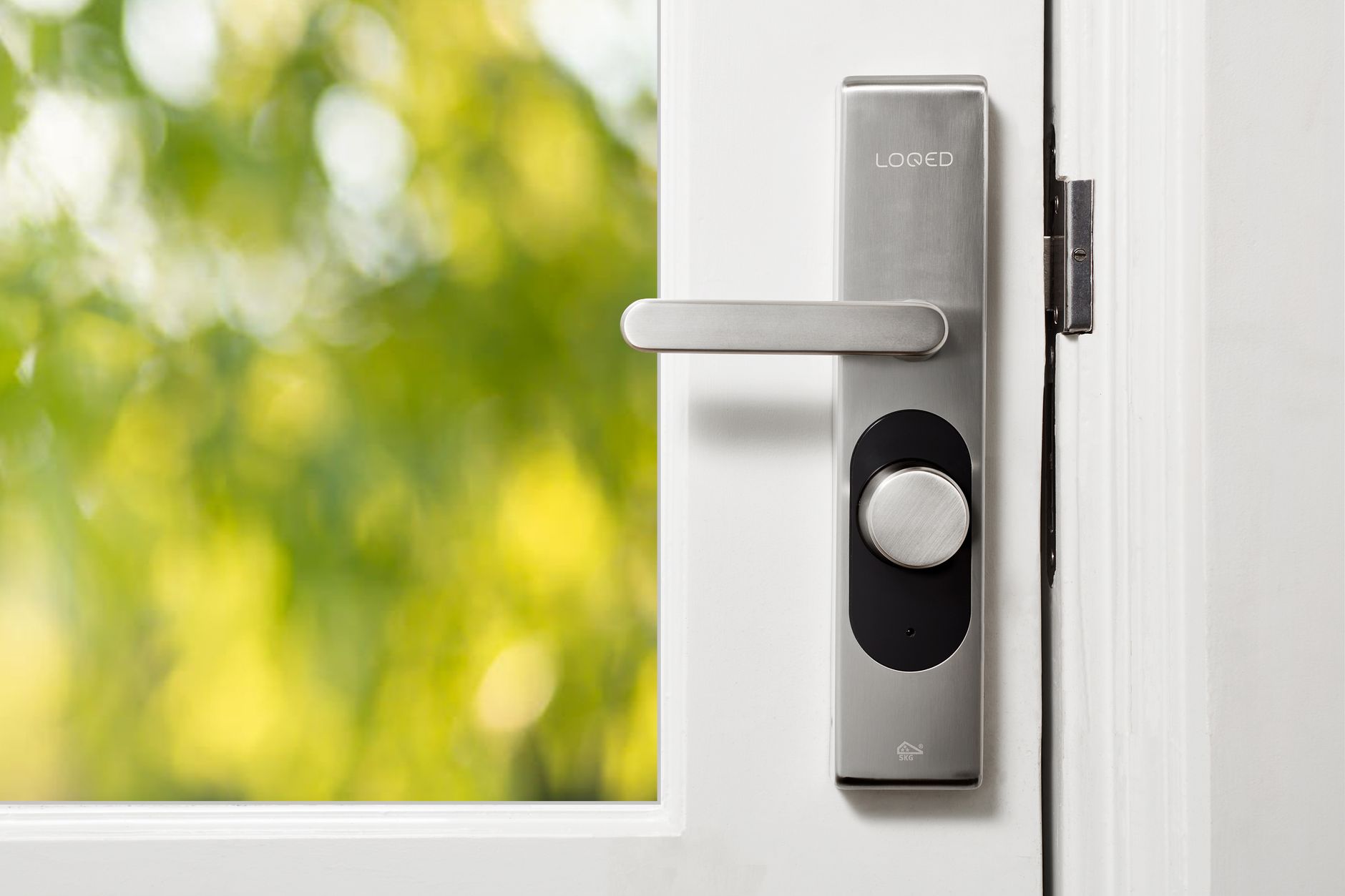
What is the best smart lock under $100? The eufy Smart Lock C210 is the best smart lock under $100 for most people because it has built-in Wi-Fi, so you get remote unlocking and Alexa or Google control with no extra bridge. Pick the Wyze Lock Bolt v2 if you want a fingerprint reader, or the TEEHO TE001 if you want to spend around $40.
Quick picks: best smart locks under $100
eufy Smart Lock C210 — best overall: built-in Wi-Fi, no bridge, remote access from anywhere.
Check price on Amazon →
Wyze Lock Bolt v2 — best fingerprint: sub-second biometric entry plus Wi-Fi, about $80.
Check price on Amazon →
TEEHO TE001 — best under $50: dead-simple keypad deadbolt with two backup keys, Amazon’s budget best seller.
Check price on Amazon →
Key takeaways
1. The eufy C210 is the only lock in this price class with built-in Wi-Fi remote access and no bridge, which is why it wins best overall.
2. The Wyze Lock Bolt v2 added Wi-Fi and a physical key to the original formula and PCWorld gave it an Editors’ Choice award at $79.98.
3. The TEEHO TE001 proves a $40 lock can be reliable: 20 PIN codes, one-time guest codes, and roughly a year on four AA batteries.
4. Apple households should pay the full $99.99 for the Aqara U50, the cheapest deadbolt with Apple Home Key tap-to-unlock.
5. Every pick here keeps a mechanical fallback (key or 9V terminal), so a dead battery never locks you out.
How do the five best smart locks under $100 compare?
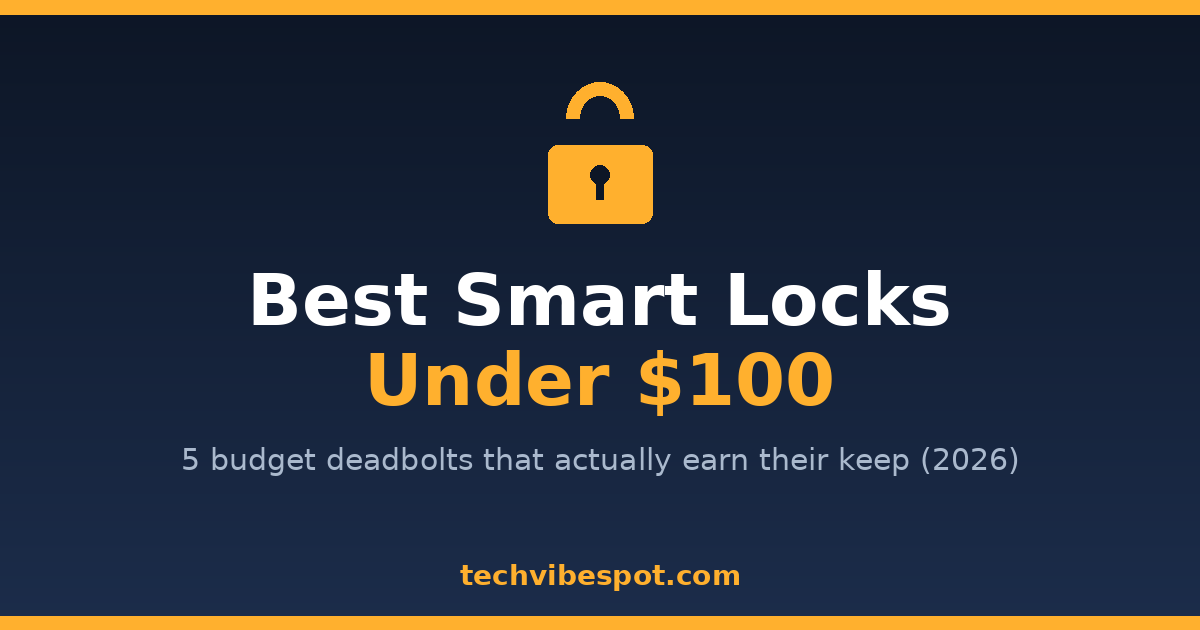
Five locks under $100 are worth buying in 2026: the eufy C210, Wyze Lock Bolt v2, original Wyze Lock Bolt, Aqara U50, and TEEHO TE001. They split cleanly by connectivity. The eufy C210 and Wyze Lock Bolt v2 have Wi-Fi built in, the Aqara U50 reaches the internet through an Apple Home or Aqara hub, and the original Lock Bolt and TEEHO TE001 work offline. The table below shows the differences at a glance.
| Lock | Street price | Connectivity | Key backup | Best for | Price |
|---|---|---|---|---|---|
| eufy Smart Lock C210 | $70–$100 | Wi-Fi (built in) | Yes | Remote access, most people | Check price |
| Wyze Lock Bolt v2 | ~$80 | Wi-Fi + Bluetooth | Yes | Fingerprint entry | Check price |
| Wyze Lock Bolt (v1) | $50–$70 | Bluetooth only | No | Cheapest fingerprint | Check price |
| Aqara U50 | $99.99 | Bluetooth + Matter, Apple Home Key | Yes | Apple Home users | Check price |
| TEEHO TE001 | ~$40–$57 | None (offline keypad) | Yes, 2 keys | Tightest budgets, rentals | Check price |
What is the best smart lock under $100 overall?
The eufy Smart Lock C210 is the best smart lock under $100 overall because it does the one thing rivals at this price skip: it connects to your 2.4GHz Wi-Fi directly, with no bridge or hub, so you can lock and unlock from anywhere in the eufy Security app. eufy calls it a 5-in-1 lock, and the count is accurate. You can open it with the app, the touchscreen keypad, a physical key, an Apple Watch, or a voice command through Alexa and Google Assistant.
The C210 lists at $99.99, and it rarely stays there. Deal trackers have logged it at $69.99 with free shipping several times over the past year, which makes it one of the cheapest Wi-Fi deadbolts ever sold. It runs on four AA batteries, installs with a screwdriver on a standard American deadbolt bore, and holds a BHMA residential certification. There is no monthly fee, and eufy’s app builds in scheduled codes and temporary guest codes, which is why it also shows up in our guide to the best smart locks for Airbnb hosts.
The compromise is biometrics: there is no fingerprint reader. You type a code, tap the app, or use your watch. Owner reviews at Home Depot and Best Buy run largely positive on installation and keypad response, with the most common complaint being occasional Wi-Fi reconnection hiccups on congested routers, a fault shared by nearly every budget Wi-Fi lock.
Buy this if: you want remote access and voice control at the lowest possible price, and a keypad is fine for daily entry.
Skip this if: you want to open the door with a fingertip. That is the next pick’s job.
Which budget smart lock has the best fingerprint reader?
The Wyze Lock Bolt v2 has the best fingerprint entry under $100. Its reader uses what Wyze calls an AI self-learning scanner that refines its match data every time you touch it, and it stores up to 50 fingerprints and 50 PIN codes. At $79.98 it also fixes the two complaints that dogged the original Lock Bolt: it adds 2.4GHz Wi-Fi for remote control and a mechanical backup key.
PCWorld’s review gave the v2 an Editors’ Choice award and called it arguably the best value on the smart lock market. The spec sheet supports that. You get an illuminated glass touchscreen with an anti-peep keypad (pad your code with random digits and it still works), one-time codes that can be set up to a week ahead, auto-lock configurable from instant to 15 minutes, Alexa and Google Home support, an IP53 weather rating, a BHMA Grade 2 rating, and about eight months of life from eight AA batteries.
Two limits are worth knowing before you click. There is no door-ajar sensor, so the lock can throw the bolt while the door sits open if you use instant auto-lock carelessly. And third-party ecosystem support stops at Alexa and Google: no Apple Home, no Matter. Owner reports echo professional reviews on the scanner, describing it as fast and accurate with occasional retries in cold or wet weather, a pattern SafeHome.org also observed on the original model, which it found read correctly about 95 percent of the time.
Buy this if: fingerprint entry is the feature you will use twenty times a day, and you still want Wi-Fi remote access.
Skip this if: your household lives in the Apple Home app, or you need the door-ajar alerts that pricier locks like the ones in our Kwikset Aura Reach review provide.
Is the original Wyze Lock Bolt still worth buying?
The original Wyze Lock Bolt is still worth buying if your only goal is fingerprint convenience at the lowest price. It launched at $69.99 and now regularly sells in the $50 to $70 range, dipping lower during sale events. For that money you get the same core trick as the v2: walk up, touch the reader, door opens.
It is a Bluetooth-only lock, and that shapes everything. Your phone must be within roughly 16 feet to control it, there is no remote unlocking from work, and there is no Alexa or Google integration. Wyze offsets the gap cleverly with one-time access codes that rotate every four hours automatically, so you can read a code to a delivery driver over the phone without ever creating an account for them. It supports 20 users, auto-locks on a 15-second to 15-minute timer, carries an IPX5 weather rating and a UL 20-minute fire rating, and runs up to 12 months on four AA batteries, longer than either Wi-Fi lock in this guide because Bluetooth sips power.
The catch that matters: no physical key backup. If the batteries die completely, you wake the lock through a USB-C port on the underside rather than a key cylinder. It works, but you need to know it before it happens. We compared this lock directly against the TEEHO in our TEEHO TE001 vs Wyze Lock Bolt head-to-head if that is your exact decision.
Buy this if: you want fingerprint entry for the price of dinner and never plan to unlock remotely.
Skip this if: a keyless lock with no keyed fallback makes you nervous, or the $10 to $25 step up to the v2 is within reach. The v2 is the better buy at close prices.
Which cheap smart lock works with Apple Home Key?
The Aqara U50 is the cheapest deadbolt with Apple Home Key, at $99.99, sneaking under the $100 line by a penny. Home Key means the lock lives in your Apple Wallet: hold your iPhone or Apple Watch near the keypad and the door opens, even if the phone’s battery is in reserve mode. No other lock in this price class does that.
Beyond the tap trick, the U50 supports Apple HomeKit, Matter, Google Home, Alexa, and IFTTT, has an IP65 weather rating (the best in this roundup), a touchscreen keypad, and a physical key backup. Pocket-lint’s review praised it as a bargain route into a HomeKit-controlled front door. The trade-offs are the mirror image of the Wyze: there is no fingerprint reader, and out of the box it is a Bluetooth lock. Remote access and automations require a hub you may already own, meaning a HomePod, an Apple TV, or an Aqara hub. If your home has none of those, the eufy C210 gives you remote control with nothing extra.
For iPhone families, though, the math flips. Codes for the babysitter live in the Home app, the lock shows up in the same automations as your lights, and unlocking is a wrist tap. If you were considering a fingerprint lock with deeper smarts, our Lockly Affirm review covers what an extra $80 buys, but no fingerprint lock under $100 speaks HomeKit.
Buy this if: your household runs on Apple devices and you already own a HomePod or Apple TV.
Skip this if: you are on Android, or you have no home hub and want remote access without buying one.
What is the best smart lock under $50?
The TEEHO TE001 is the best smart lock under $50, and it is not close. TEEHO lists it at $56.99 on its official product page, but on Amazon it routinely sells near $40 and it has spent long stretches as the best-selling door hardware item on the site. It is a keypad deadbolt with no app, no radio, and no account, which for many buyers is exactly the appeal.
The feature set is tight but complete. It stores up to 20 PIN codes plus one-time codes that delete themselves after a single use, handy for a cleaner or a contractor. Long-press any key for about a second and a half and it locks; leave it and auto-lock throws the bolt on its own. It runs about a year on four AA batteries with a low-battery warning at 15 percent, carries an IP54 weather rating across an operating range of -22°F to 158°F, includes two mechanical backup keys, and installs with a Phillips screwdriver in the same bore as an ordinary deadbolt. There is a 12-month warranty behind it.
What you give up is everything wireless: no remote unlocking, no entry log, no voice control, and codes are programmed on the keypad itself rather than in an app. If those trade-offs sound fine, you are the buyer this lock was built for, and the money you save covers a year of batteries for the whole house. We ranked it against every rival in our best keypad deadbolts under $100 guide, where it also took the value crown.
Buy this if: you want to stop carrying keys for $40 and could not care less about apps.
Skip this if: you want to let someone in while you are away from home. That requires Wi-Fi, and that requires the eufy or the Wyze v2.
What do you give up by staying under $100?
Staying under $100 costs you four things, and knowing them tells you whether to stretch your budget. First, premium biometrics: palm-vein readers, 3D face recognition, and the fastest fingerprint sensors live in the $150-plus tier. Second, door-sense hardware. None of these five locks knows whether the door is open or shut, so auto-lock runs on a timer instead of an event. Third, broad ecosystem depth. Matter and Apple Home coverage under $100 exists only on the Aqara U50, and even there through a hub. Fourth, heavier security certifications: you get BHMA residential and Grade 2 ratings here, while ANSI Grade 1 commercial-strength deadbolts start higher.
What you do not give up is the part that matters most. All five locks use a real deadbolt throw, all five have weather ratings suitable for exposed doors, and all five keep a non-electronic fallback. Owner-reported reliability for the locks in this guide tracks closely with models double the price. The budget tier in 2026 is not a toy tier.
How should you choose between them?
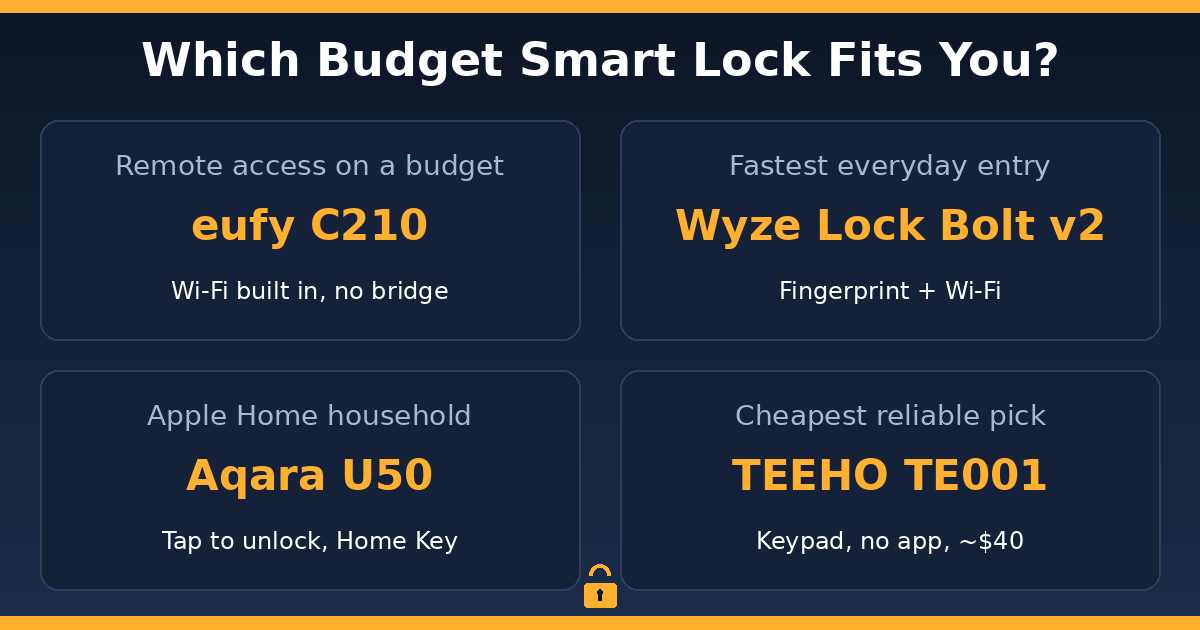
Match the lock to the person who will use it most, not to the spec sheet. If you are a renter or a first-time buyer easing into smart hardware, get the TEEHO TE001: cheap, offline, landlord-friendly. If you are a busy family that loses keys and wants grandma to get in with a code you text her from work, get the eufy C210. If you are the person who stands at the door with grocery bags in both hands, get the Wyze Lock Bolt v2 and enroll a knuckle for exactly that situation. If you are an Apple household with a HomePod in the kitchen, get the Aqara U50 and unlock with your watch. If you want fingerprint entry and your total budget is $60, get the original Wyze Lock Bolt and accept the missing key cylinder.
Check three things about your door before ordering any of them. Measure the backset (2-3/8″ or 2-3/4″; all five adjust to both), confirm your door thickness is standard (1-3/8″ to 1-3/4″), and make sure the deadbolt hole is a standard 2-1/8″ bore. If your door has a non-standard European multipoint mechanism, none of these fit, and a retrofit lock is the answer instead.
Verdict: which smart lock under $100 should you buy?
Buy the eufy Smart Lock C210. Remote access is the feature that makes a smart lock smart, and the C210 is the only lock in this class that delivers it with no bridge, no hub, and no subscription, at a street price that regularly touches $70. The Wyze Lock Bolt v2 is the pick if fingerprint entry outranks ecosystem support in your house, and it earns its Editors’ Choice reputation. The TEEHO TE001 remains the smartest $40 anyone can spend on a front door.
Prices in the budget tier move weekly, and all three top picks dip well below list several times a year, so it is worth checking the current number before you decide.
Check the eufy C210’s price on Amazon →
Prices checked July 23, 2026.
Frequently asked questions
Are smart locks under $100 secure enough for a front door?
Yes. The Wyze Lock Bolt v2 carries a BHMA Grade 2 rating and the eufy C210 holds BHMA residential certification, the same class of rating found on locks costing twice as much. A budget smart lock is no easier to force than the mid-grade mechanical deadbolt it replaces, and code-based entry removes the risk of hidden spare keys.
Do budget smart locks need a hub or bridge?
The eufy C210 and Wyze Lock Bolt v2 do not; both have Wi-Fi built in. The Aqara U50 needs an Apple Home hub or Aqara hub for remote features. The original Wyze Lock Bolt and TEEHO TE001 have no internet features at all, so there is nothing to bridge.
What happens if the batteries die? Am I locked out?
No. The eufy C210, Aqara U50, Wyze Lock Bolt v2, and TEEHO TE001 all include physical backup keys. The original Wyze Lock Bolt has no key but wakes from a portable power bank through its USB-C port. Every lock here also warns you weeks in advance as battery levels fall.
Can a smart lock under $100 work with Apple HomeKit?
Yes, one: the Aqara U50 at $99.99 supports Apple HomeKit, Apple Home Key tap-to-unlock, and Matter. It is the only sub-$100 deadbolt with Apple integration, and remote control requires a HomePod, Apple TV, or Aqara hub acting as a home hub.
Is the eufy C210 better than the Wyze Lock Bolt v2?
The eufy C210 is better for remote-access reliability and Apple Watch support, and it often sells for less. The Wyze Lock Bolt v2 is better for daily convenience because of its fingerprint reader and higher code capacity. Both have Wi-Fi, so the deciding question is keypad versus fingertip.
How long do batteries last in a budget smart lock?
Offline locks last longest: the TEEHO TE001 and original Wyze Lock Bolt run about 12 months on four AA batteries. Wi-Fi locks trade life for reach, with the eufy C210 and Wyze Lock Bolt v2 running roughly 8 months. Cold climates shorten all of these figures.
Can cheap smart locks be hacked or picked?
The realistic risks are the same as any deadbolt: forced entry and lock picking of the backup cylinder. The wireless attack surface on these models is small because most are offline or Bluetooth-paired, and the Wi-Fi models use encrypted app channels. Features like the Wyze v2’s anti-peep keypad also block shoulder-surfing of codes.