TechVibeSpot earns a commission if you buy through links on this page. That never changes a verdict.
Hands-free door unlocking stopped being a demo this month. On July 23, 2026, The Gadgeteer published a five-lock roundup of UWB smart locks that unlock themselves, and search interest in ultra-wideband locks jumped with it. The timing makes sense: Apple Home added hands-free auto-unlock in June 2026, and for the first time you can walk up to your own front door with your phone in your pocket, grocery bags in both hands, and hear the deadbolt retract before you touch anything.
Two locks matter most in this conversation. The Aqara U400 ($269.99, roughly £215 / AU$410) is one of the world’s first Apple UWB smart locks and the cheapest way into true hands-free entry. The Ultraloq Bolt Mission ($399, roughly £315 / AU$610) was the world’s first UWB smart lock, shown at CES 2025 by U-tec (now under the Xthings brand umbrella), and it covers more platforms. Both are shipping now in the US.
This guide compares them head to head, explains how the radio trick actually works, and maps out cheaper non-UWB alternatives for anyone who thinks $270 is too much to spend on a deadbolt. Prices are checked as of July 2026 at US retailers.
How we assess: research/news-based analysis, not hands-on testing.
What is the best UWB smart lock in 2026? The Aqara U400 ($269.99) is the best UWB smart lock for Apple households: it pairs ultra-wideband hands-free unlocking with Apple Home Key, Matter over Thread, and a fingerprint reader for $130 less than rivals. If you run Alexa, Google Home, or SmartThings alongside Apple, the Ultraloq Bolt Mission ($399) is the stronger pick.
Key takeaways (July 2026)
- The Aqara U400 costs $269.99, runs up to 6 months per charge, and offers 8 unlock methods including UWB hands-free entry.
- The Ultraloq Bolt Mission costs $399, runs up to 12 months on a charge, and supports 5 major platforms: Apple Home, Alexa, Google, SmartThings, and Home Assistant.
- Apple’s UWB auto-unlock needs an iPhone 11 or later (or Apple Watch Series 6+) on iOS/watchOS 18.5 or newer, plus a Thread-enabled home hub.
- The budget play: Ultraloq U-Bolt Pro WiFi at $129.99 gets you geofence-based auto-unlock, fingerprint, and keypad, with no UWB.
- Only 3 UWB locks are shipping in the US as of July 2026: the Bolt Mission, the Aqara U400, and the $399 Schlage Sense Pro (launched June 29).
- Fingerprint entry on the U400 takes 0.3 seconds with a claimed 98.6% recognition rate, per Aqara’s spec sheet.
How does UWB auto-unlock actually work?
UWB auto-unlock works by measuring your phone’s exact position, direction, and speed of approach, then firing the deadbolt only when the lock is confident you are walking up to the door from outside. Ultra-wideband is the same short-range radio that powers Apple’s AirTag Precision Finding, and it resolves location to centimeter-level accuracy. That precision is the whole story. Bluetooth proximity and GPS geofencing can tell a lock you are nearby; UWB can tell it you are three feet away, outside, and moving toward the handle rather than sitting on the couch just inside.
Apple formalized this in June 2026, when Apple Home gained hands-free auto-unlock for compatible locks. 9to5Mac’s June 16 coverage of the launch describes the system using ultra-wideband plus your home key on a compatible iPhone or Apple Watch, calculating “speed, trajectory, and motion” so the door unlocks precisely as you reach it (9to5mac.com). The feature requires an iPhone 11 or later, excluding the SE models and the 16e, running iOS 18.5 or newer, or an Apple Watch Series 6 or later on watchOS 18.5+. You also need a Thread-enabled Apple Home hub such as a HomePod mini or Apple TV 4K sitting inside the house.
Ultraloq got to UWB first by a different route. The Bolt Mission, unveiled at CES 2025, runs its approach-to-unlock through U-tec’s own U home app and the lock’s built-in UWB radio, so it does not depend on Apple’s home key system to do the hands-free part. Gearbrain’s coverage notes the lock can “determine a connected device’s distance and direction with centimeter-level accuracy,” staying locked while you move around indoors (gearbrain.com).
The practical result is the same in both cases: no tapping, no fingerprint, no code. You walk up, the bolt slides back, you push the door open. The Gadgeteer’s July 23 roundup calls this the moment UWB is “finally here,” and with three locks actually shipping, that claim holds up.
Is the Aqara U400 worth $269.99?
Yes, if you live in Apple Home: the U400 is the cheapest lock that does true hands-free UWB unlocking, and it stacks seven more entry methods on top. Aqara launched it in January 2026 as one of the world’s first Apple UWB smart locks, and at $269.99 (about £215 / AU$410) it undercuts both the Ultraloq Bolt Mission and the Schlage Sense Pro by $130.
The spec sheet is dense. The U400 runs Matter over Thread, so it slots into Apple Home, Google Home, Alexa, Home Assistant, and Samsung SmartThings through any Thread-enabled Matter controller. Unlock methods: UWB hands-free approach, Apple Home Key tap, fingerprint (up to 50 prints stored, 0.3-second reads, 98.6% claimed accuracy), touchscreen passcodes with scheduled and one-time variants, app control, voice assistants, an NFC card sold separately, and a plain mechanical key. That is eight ways into your house. The battery is a removable rechargeable lithium pack rated for up to 6 months per charge, with a low-battery alert at 20% and a USB-C port on the exterior for emergency top-ups from a power bank (us.aqara.com).
Independent reviewers back the headline feature. Tom’s Guide’s U400 review found the UWB hands-free unlocking “worked quite well” and “detected approach and unlocked consistently almost every time,” with occasional lag when relying on an Apple Watch alone, and called the U400 easily one of the best locks for Apple households (tomsguide.com). The same review flags the honest downsides: the interior assembly is bulkier than a standard deadbolt, and six months of battery is mediocre next to year-long AA-powered rivals.
One catch buyers keep missing: the UWB and Home Key features are Apple-only. Pair the U400 with Alexa or Google and you get a very good Matter fingerprint lock, but the hands-free magic stays switched off.
Check the Aqara U400 price on Amazon
Is the Ultraloq Bolt Mission worth $399?
The Bolt Mission is worth $399 only if you need UWB hands-free entry outside a pure Apple setup, or you refuse to charge a lock battery twice a year. This is the lock that started the category. U-tec showed it at CES 2025 as the world’s first ultra-wideband smart lock, and it began shipping in the US in 2025 through U-tec.com, Amazon, and Best Buy.
Platform coverage is its strongest argument. The Amazon listing confirms Matter over Thread plus support for Apple Home, Alexa, Google, SmartThings, and Home Assistant, with UWB, NFC tap-to-unlock, app control, and keypad codes rounding out entry methods. Because the approach-to-unlock logic lives in U-tec’s U home app rather than inside Apple’s home key framework, the hands-free feature is not locked to one ecosystem the way the U400’s is. Gearbrain’s write-up adds the durability case: BHMA Level 1 certification, IP65 weather resistance, 128-bit AES encryption, and battery life of up to one year, double the U400’s rating (gearbrain.com).
The price is the problem. At $399 (about £315 / AU$610) it costs as much as the Schlage Sense Pro and $130 more than the U400, and Ultraloq’s own catalog undercuts it: the Bolt NFC does tap-to-unlock on iPhone and Android for $149.99, and the U-Bolt Pro WiFi does geofence auto-unlock for $129.99. You are paying a $250 premium over the WiFi model for centimeter-accurate radio and a longer battery.
Buy the Bolt Mission if your household mixes iPhones with Android or you run Alexa or SmartThings as your primary platform and still want walk-up unlocking. Skip it if everyone in the house carries an iPhone; the U400 does the same trick for $130 less.
Check the Ultraloq Bolt Mission price on Amazon
Aqara U400 vs Ultraloq Bolt Mission: which should you buy?
Buy the Aqara U400 if you use Apple Home; buy the Ultraloq Bolt Mission if you need hands-free unlocking on anything else. That single sentence settles most purchases, and the $130 price gap makes it an easy call for Apple households.
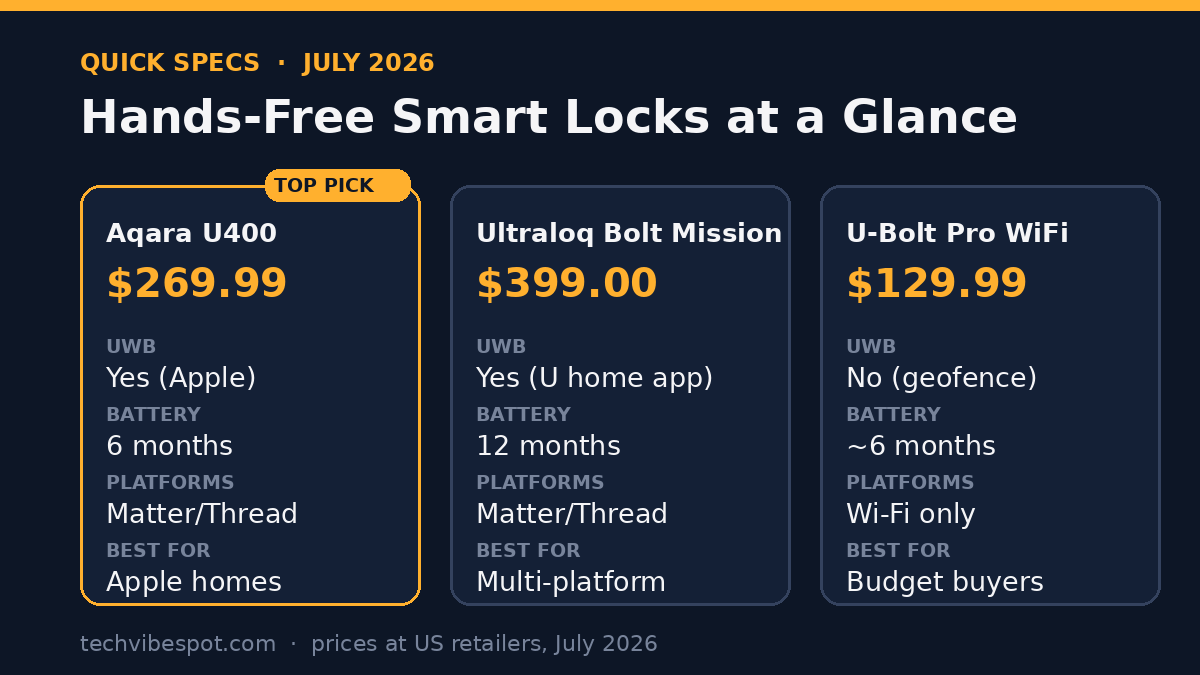
Here is the full picture, with the budget alternative included:
| Spec | Aqara U400 | Ultraloq Bolt Mission | Ultraloq U-Bolt Pro WiFi |
|---|---|---|---|
| Price (July 2026) | $269.99 | $399.00 | $129.99 |
| UWB hands-free unlock | Yes (Apple only) | Yes (via U home app) | No (geofence auto-unlock) |
| Platforms | Apple Home, Alexa, Google, SmartThings, Home Assistant (Matter over Thread) | Apple Home, Alexa, Google, SmartThings, Home Assistant (Matter over Thread) | Alexa, Google (Wi-Fi, no Matter) |
| Battery | Up to 6 months, rechargeable, USB-C | Up to 12 months | About 6 months |
| Unlock methods | 8: UWB, Home Key, fingerprint, keypad, app, voice, NFC card, key | UWB, NFC, keypad code, app, key | Fingerprint, keypad, app, auto-unlock, key |
| Security rating | BHMA certified, IP65 | BHMA Level 1, IP65, AES-128 | ANSI Grade 1, IP65 |
| Best for | Apple households | Mixed or non-Apple platforms | Budget buyers |
A few details tilt individual cases. The Bolt Mission’s year-long battery matters for rental properties and second homes where nobody wants a charging chore. The U400’s fingerprint reader and Home Key tap give family members without UWB-capable devices fast fallback options, and its removable battery charges indoors while a USB-C port covers lockouts. If you want a keypad-first lock and treat the phone as backup, both work, but the U400’s touchscreen supports scheduled and one-time codes for cleaners and guests out of the box.
The dark horse is the Schlage Sense Pro, the $399 lock that headlined Apple’s June announcement. It matches the Bolt Mission’s price with Schlage’s residential-security pedigree, but it launched June 29, 2026, and is the newest and least-reviewed of the three. Buyers who want maximum brand assurance on the hardware side should watch it; value buyers still land on the U400.
What’s the best budget alternative without UWB?
The Ultraloq U-Bolt Pro WiFi at $129.99 (about £102 / AU$198) is the best budget alternative: it fakes 80% of the hands-free experience using GPS geofencing at a third of the Bolt Mission’s price. When your phone re-enters a radius around home, the lock arms an auto-unlock that triggers on arrival. It is slower and coarser than UWB, and it cannot judge whether you are inside or outside the door, but for most people coming home from work it feels similar: walk up, door opens.
Beyond geofencing, the U-Bolt Pro WiFi is a complete mid-range lock. You get a fingerprint reader, a backlit keypad, app control over built-in Wi-Fi with no hub, a door sensor so the app knows open versus closed, ANSI Grade 1 certification, and roughly six months on a set of batteries. The Gadgeteer’s July 23 roundup includes it as the value pick precisely because it needs no Thread hub, no Matter controller, and no ecosystem commitment (the-gadgeteer.com). The trade-off is equally clear: no UWB, no Thread, no Matter, so it will not join an Apple Home setup.
Check the Ultraloq U-Bolt Pro WiFi price on Amazon
Apple users on a budget have a different answer: the Aqara U100 at $149.99 (about £118 / AU$228). It supports Apple Home Key, so you tap your iPhone or Watch to the reader and the door opens, plus fingerprint, a touchscreen keypad, and NFC. It runs on four AA batteries and carries the same IP65 weatherproofing as the U400. Tap-to-unlock is one deliberate motion more than UWB’s zero motions, and for a $120 saving many buyers will take that deal.
Check the Aqara U100 price on Amazon
One more mid-priced curveball deserves a mention. The Gadgeteer’s roundup also features the SwitchBot Lock Vision Pro at $229.99, which skips UWB entirely in favor of 3D face recognition, palm vein scanning, and fingerprint entry, with a 12-month battery and Matter over Wi-Fi. Face and palm recognition get you a different flavor of hands-free: you still stop at the door, but you touch nothing. It is a credible option for households that want biometrics without an ecosystem commitment, though it lacks the walking-pace convenience that makes UWB feel invisible.
The use-case map is simple. All-in on Apple Home with the budget for it: Aqara U400. Running Alexa, Google, or a mixed-phone household and set on UWB: Ultraloq Bolt Mission. On a $150 ceiling: U-Bolt Pro WiFi for Android-first homes, Aqara U100 for iPhone-first homes. Want biometrics over radios: SwitchBot Lock Vision Pro.
Is UWB unlocking secure?
UWB unlocking is more secure than the geofence and Bluetooth auto-unlock systems it replaces, because precision is a security property here. The classic failure mode of geofence auto-unlock is the false positive: your phone wanders inside the radius, or you sit in the backyard, and the front door quietly unlocks. UWB’s centimeter-level ranging plus direction and motion detection means the lock can require an approach trajectory from outside before it fires. Aqara states the U400’s activation depends on proximity and angular measurement specifically to prevent accidental unlocking when you are indoors (us.aqara.com), and Schlage markets its Sense Pro implementation as more precise than geofencing or proximity-only technologies.
UWB ranging is also inherently resistant to relay attacks, the technique used against many car key fobs, because the time-of-flight measurement makes distance hard to spoof: a relayed signal arrives measurably late. That is the same reason the automotive industry adopted UWB for digital car keys.
The rest of the security story is conventional and solid on both flagship locks. The Bolt Mission carries BHMA Level 1 certification with 128-bit AES encryption on communications. The U400 is BHMA certified with an IP65-rated exterior and a rekeyable cylinder. On the Apple side, hands-free unlock rides on home key credentials stored in the iPhone’s Secure Element, and the phone must be unlocked-capable and on your person; a stolen locked iPhone still demands Face ID or a passcode before it becomes anyone’s front-door key.
Reasonable caveats remain. Any auto-unlock system trades a sliver of control for convenience, and a hands-free lock will open the door when you approach it whether or not you intended to go in. Both locks let you disable the feature per user or entirely. And a smart lock is still a deadbolt: door frame quality and strike-plate screws defeat more burglars than radio protocols do.
Who should skip UWB locks for now?
Skip UWB locks if you carry an Android phone and live in Apple-free smart home, if your budget caps below $250, or if anyone in your household runs an older iPhone. The category is real but young, and the compatibility fine print excludes more people than the marketing suggests.
Android users face the sharpest limits. Apple’s hands-free auto-unlock is exclusive to iPhone and Apple Watch, so on the U400 and Schlage Sense Pro an Android phone gets zero UWB benefit. The Bolt Mission’s app-based system is the more platform-open design, but hands-free coverage across the fragmented Android UWB landscape (only certain flagships like recent Galaxy S and Pixel Pro models even carry UWB radios) is something to verify against U-tec’s current compatibility list before buying. To be explicit about what is confirmed versus not: shipping today are the Bolt Mission, the U400, and the Schlage Sense Pro; broad, standardized hands-free unlocking for Android through Matter or Google Home is speculative as of July 2026, with no announced ship date.
Owners of older Apple hardware should also wait or buy cheaper. The auto-unlock feature needs an iPhone 11 or later (not the SE or 16e) on iOS 18.5+, an Apple Watch Series 6 or later, and a Thread-capable hub like a HomePod mini or Apple TV 4K. If any piece is missing, you are paying the UWB premium for a feature you cannot use, and a $149.99 Aqara U100 with Home Key delivers nearly the same daily experience.
Renters and owners of non-standard doors should check the boring details before the exciting ones. All three UWB locks are single-cylinder deadbolt replacements designed for standard US bore holes, and all require swapping the interior assembly, which some landlords prohibit. Measure your backset and door thickness against the manufacturer’s fit guide, and remember that a warped door or misaligned strike will jam any motorized bolt regardless of how clever its radio is.
Finally, patient buyers have a decent hand. With Schlage joining at $399 in June and SwitchBot pushing biometric alternatives like the $229.99 Lock Vision Pro, competitive pressure on the category is building through late 2026. Nobody should expect the U400 to be the last sub-$300 UWB lock, though any prediction about specific price cuts is exactly that, a prediction.
FAQ: UWB smart locks in 2026
What iPhone do I need for UWB auto-unlock?
You need an iPhone 11 or later running iOS 18.5 or newer, excluding the iPhone SE models and the 16e, which lack the required ultra-wideband chip. An Apple Watch Series 6 or later on watchOS 18.5+ also works. You also need a Thread-enabled Apple Home hub, such as a HomePod mini or Apple TV 4K.
How much does the Aqara U400 cost?
The Aqara U400 lists at $269.99 in the US as of July 2026, roughly £215 or AU$410. That makes it about $130 cheaper than the two other shipping UWB locks, the Ultraloq Bolt Mission and the Schlage Sense Pro, which both list at $399.
Does the Ultraloq Bolt Mission work with Android?
Partly. The Bolt Mission’s NFC tap-to-unlock, keypad, and app control all work with Android, and its UWB approach-to-unlock runs through the U home app rather than Apple’s home key system. Hands-free support depends on your specific phone having a UWB radio, so check U-tec’s compatibility list before buying.
How long do UWB smart lock batteries last?
The Ultraloq Bolt Mission is rated for up to 12 months per charge, while the Aqara U400’s rechargeable pack is rated for up to 6 months, with a low-battery alert at 20% and emergency USB-C charging from a power bank if it dies completely.
Can a UWB lock unlock accidentally while I’m at home?
The system is designed to prevent that. UWB measures position, direction, and motion with centimeter-level accuracy, so the lock only triggers when you approach from outside. Aqara states the U400 uses proximity plus angular measurement specifically to avoid firing while you walk around indoors.
Is there a cheap smart lock with hands-free unlocking?
The closest budget option is the Ultraloq U-Bolt Pro WiFi at $129.99, which uses GPS geofencing to auto-unlock when you arrive home. It is less precise than UWB and has no Matter or Thread support, but it delivers a similar walk-up experience for a third of the Bolt Mission’s price.
Does the Aqara U400 work with Alexa and Google Home?
Yes, through Matter over Thread the U400 works with Alexa, Google Home, SmartThings, and Home Assistant, but only for standard lock control. Both UWB hands-free unlocking and Apple Home Key are exclusive to Apple devices, so non-Apple households lose the U400’s two signature features.
How many UWB smart locks are available in July 2026?
Three are shipping in the US: the Ultraloq Bolt Mission ($399), the world’s first UWB smart lock; the Aqara U400 ($269.99), one of the first Apple UWB locks; and the Schlage Sense Pro ($399), which launched June 29, 2026 alongside Apple Home’s hands-free auto-unlock feature.
Sources
- The Gadgeteer: 5 Smart Locks That Unlock Themselves (UWB Is Finally Here) — Verified July 24, 2026
- 9to5Mac: Apple Home adds new smart lock with auto-unlock that’s hands-free — Verified July 24, 2026
- Aqara: Smart Lock U400 official product page — Verified July 24, 2026
- Tom’s Guide: Aqara U400 review — Verified July 24, 2026