TechVibeSpot earns a commission if you buy through links on this page. That never changes a verdict.
Your router goes down, and suddenly half your “smart” home is a brick. That is the exact scenario a smart lock without WiFi is built to survive. Whether your front door sits in a dead zone, you rent a cabin with no internet, or you simply refuse to put your deadbolt on the same network as your kids’ tablets, there is a whole class of locks that authenticate at the door itself: fingerprint, PIN code, Bluetooth, Thread, or plain old buttons. This guide covers the five best options in 2026, from a $45 keypad deadbolt with zero radios inside to a Matter lock that talks to Alexa without ever touching your WiFi.
Featured photo: Joppe Beurskens / Pexels
How we assess: this review is based on manufacturer specs, official documentation, and verified owner reports, not hands-on testing.
Do smart locks work without WiFi? Yes. Smart locks that use fingerprint readers, keypads, Bluetooth, Zigbee, or Thread work fully without WiFi: codes and fingerprints are stored in the lock itself, so it locks and unlocks with no internet at all. You only lose remote, out-of-home control, which needs WiFi or a hub.
Quick picks: the best no-WiFi smart locks
Best under $100: Wyze Lock Bolt ($79.99) — fingerprint + keypad + auto-lock with no hub and no subscription; the best value in the category.
Cheapest, zero radios: TEEHO TE001 (~$45) — offline keypad deadbolt with no app and nothing to hack; ideal for rentals and back doors.
Best for iPhone: Aqara U100 ($189.99) — Apple Home Key tap-to-unlock plus fingerprint, with an optional hub for remote access later (linked in the comparison table below).
Key takeaways
- The Wyze Lock Bolt ($79.99) is the best smart lock without WiFi for most people: fingerprint, keypad, and auto-lock with no internet, hub, or subscription required.
- The TEEHO TE001 (~$45) has no radios at all, not even Bluetooth, which makes it the most hack-resistant and the cheapest pick here.
- The Aqara U100 ($189.99) adds Apple Home Key and unlocks from an iPhone or Apple Watch over NFC, no WiFi involved.
- Thread and Matter locks like the Level Bolt and Kwikset Aura Reach give you app control and voice assistants through a hub instead of a WiFi radio in the lock.
- Skipping WiFi buys you 8 to 12 months of battery life; WiFi locks often need charging every 2 to 4 months.
Do Smart Locks Really Work Without WiFi?
They do, because almost everything a smart lock does happens locally. A smart lock without WiFi stores your PIN codes and fingerprint templates in memory on the lock itself. When you tap a code into a TEEHO TE001 or press a finger on a Wyze Lock Bolt, the lock checks the input against its own stored list and fires the motor. No packet ever leaves your porch. The SafeHome.org review of the Wyze Lock Bolt confirms the lock runs entirely on Bluetooth 5.0 with roughly a 16-foot range and has no WiFi capability at all, yet still supports 50 fingerprints, 20 codes, and scheduled access.
The internet only enters the picture for remote features: unlocking for a guest while you are at work, checking lock status from a hotel, or getting a push alert the moment the door opens. Those features need a path from the lock to the cloud, which means WiFi in the lock, or a plug-in bridge, or a Thread/Zigbee hub. Every lock in this guide handles day-to-day locking and unlocking with the internet completely down. Three of them can add remote control later through a hub if you change your mind, and two of them never phone home because they physically cannot.
What Do You Give Up When You Skip WiFi?
You give up three things: remote control, real-time alerts, and some voice-assistant tricks. If a dog walker shows up early and you are across town, a Bluetooth-only lock like the Wyze Lock Bolt cannot open the door for them; the workaround is a pre-issued code, and Wyze lets you generate offline emergency codes from the app for exactly this case. You also lose live notifications, so the lock keeps an access log you read later rather than pinging your phone in the moment.
What you gain is bigger than most buyers expect. Battery life stretches dramatically because a WiFi radio is the single hungriest component in a smart lock: the Wyze Lock Bolt runs up to 12 months on four AA batteries, and the Aqara U100 manages around 8 months, while typical WiFi deadbolts need fresh batteries or a recharge every 2 to 4 months. Your attack surface shrinks too. A lock with no WiFi cannot be reached from the internet, credential-stuffed, or knocked offline by a botched cloud update. And a no-WiFi lock keeps working identically during an outage, which is precisely when you do not want to be fiddling with your door.
Comparison: The 5 Best Smart Locks Without WiFi in 2026
| Product | Price | Connectivity | Key backup | Best for | |
|---|---|---|---|---|---|
| Wyze Lock Bolt | $79.99 | Bluetooth 5.0 only | No (keypad + fingerprint) | Most people; best value | Check price |
| TEEHO TE001 | ~$45 | None (offline keypad) | Yes, 2 keys | Cheapest; zero radios | Check price |
| Aqara U100 | $189.99 | Bluetooth, Zigbee, NFC | Yes, 2 keys + USB-C | Apple Home Key users | Check price |
| Level Bolt | $112–$199 | Bluetooth / Matter-over-Thread | Yes, your existing keys | Invisible upgrade; HOAs | Check price |
| Kwikset Aura Reach | $189 | Matter-over-Thread + Bluetooth | Yes, keyed cylinder | Smart homes without WiFi locks | Check price |
Is the Wyze Lock Bolt the Best Smart Lock Without WiFi?
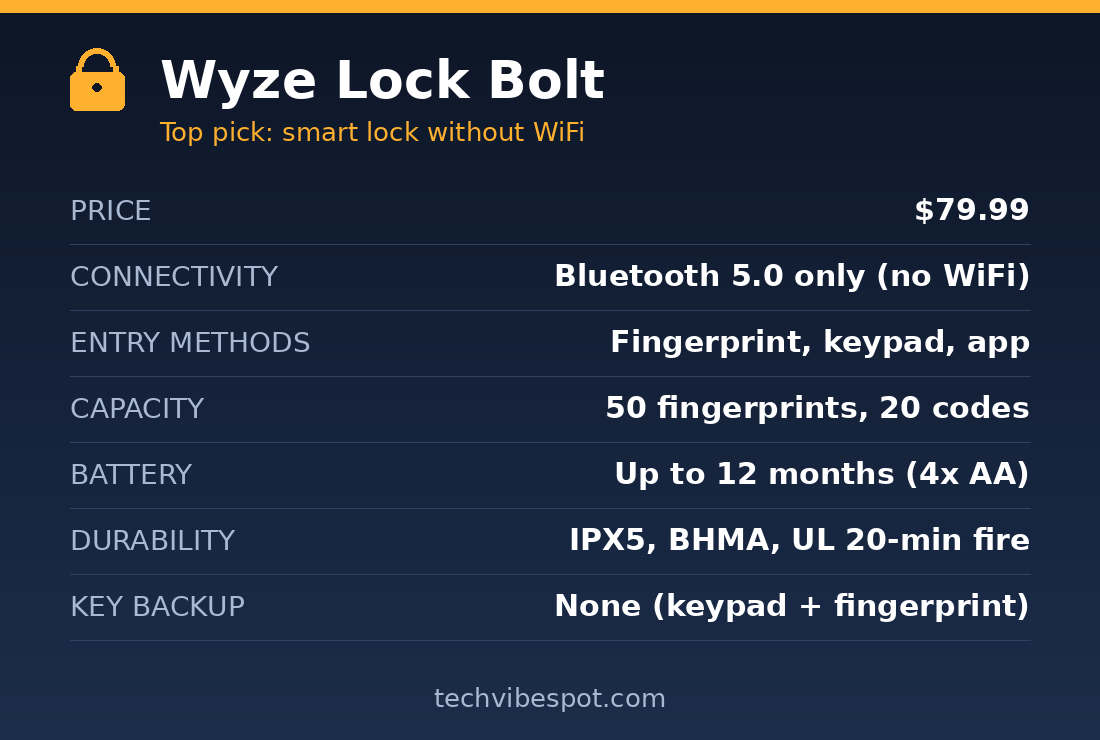
For most doors, yes: the Wyze Lock Bolt is the best smart lock without WiFi you can buy in 2026, because it packs a fingerprint reader, a backlit keypad, and auto-lock into a $79.99 deadbolt that never asks for your network password. The lock is Bluetooth 5.0 only, by design. Fingerprints unlock it in under a second, and it stores 50 of them plus 20 PIN codes, enough for a large family and a rotating cast of guests. SafeHome.org reports the fingerprint reader works reliably about 95% of the time, with occasional second tries in cold or wet weather, and rates the roughly 30-minute installation as beginner-friendly. It carries an IPX5 weather rating, a BHMA certification, and a UL 20-minute fire rating, and it runs up to 12 months on four AA batteries.
The Wyze app connects over Bluetooth when you are within range to manage codes, review the access log, and set auto-lock timing from 30 seconds to several minutes. One clever touch for an offline lock: the app can generate one-time emergency codes that work without any connection to the lock, so you can text a code to a neighbor while you are away. The trade-offs are real but predictable. There is no physical keyway, so your fallbacks are the keypad and the fingerprint reader; if the batteries die completely, you jump-start nothing, which is why the lock nags you for weeks beforehand. There is no Alexa, Google, or HomeKit integration either. We compared it directly against its cheapest rival in our TEEHO TE001 vs Wyze Lock Bolt breakdown if you are torn between the two.
Buy this if: you want fingerprint entry, auto-lock, and app-managed codes with zero WiFi, zero hub, and zero subscription.
Skip this if: you need remote unlocking, voice control, or a physical key backup.
Why Choose the TEEHO TE001 If You Want No Radios at All?
The TEEHO TE001 is the pick when the honest answer to “which wireless protocol do you want?” is “none.” It is a pure offline keypad deadbolt, typically around $45, with no WiFi, no Bluetooth, no app, and therefore no wireless attack surface whatsoever. You program up to 20 codes directly on the keypad, and TEEHO’s documentation lists ANSI Grade 3 certification, IP54 weather resistance, an anti-peep feature that lets you pad a code with random digits so shoulder-surfers learn nothing, one-touch locking, and two physical backup keys. Auto-lock can be set to engage 10 to 99 seconds after the door closes.
This is the lock that has quietly become Amazon’s best-selling keypad deadbolt, and the appeal is easy to state: it removes keys from your life for the price of a dinner out. It is also the strongest answer in this guide to the security question, because a lock with no radios cannot be jammed, relayed, sniffed, or exploited remotely; an attacker has to stand at your door like it’s 1995. The costs are equally plain. There is no access log, no way to know whether the door is locked while you are away, and code changes happen at the keypad, so managing codes for an Airbnb from another city is off the table. If sub-$100 is your lane, our best smart locks under $100 roundup covers what another $30 or so buys you.
Buy this if: you want keyless entry at the lowest possible price and consider “no connectivity” a feature, not a compromise.
Skip this if: you want any form of app control, fingerprint entry, or an access history.
Is the Aqara U100 Worth $189.99 for Apple Users?
The Aqara U100 is the best smart lock without WiFi for iPhone owners, because it supports Apple Home Key: hold your iPhone or Apple Watch near the reader and the door opens over NFC, with no WiFi, no hub, and no app open. Apple’s protocol even works in power-reserve mode, so per Aqara’s official specs, the U100 unlocks with an iPhone whose battery has already “died.” Beyond Home Key, it stacks a fingerprint reader rated at 98.6% accuracy with 50-print storage, a touchscreen keypad with the same anti-peep padding trick as the TEEHO, two mechanical backup keys, and a USB-C port on the underside that jump-starts the lock from any power bank if the eight-months-per-set AA batteries ever die.
Connectivity is Bluetooth 5.0 plus Zigbee 3.0, and this is where the U100 out-flexes everything cheaper: pair it with an Aqara Zigbee hub later and you get remote access, Alexa, Google Home, and full HomeKit automations, all without the lock itself ever joining your WiFi. The IP65 housing is rated from -31°F to 151°F, the widest range in this guide, which matters if your winters are brutal. Owner grumbles cluster around two points: the Aqara app is dense to the point of overwhelming, and Home Key setup requires a few careful steps in the Apple Home app. At $189.99 list (street prices dip to about $160), it costs four TEEHOs. For an iPhone household, the tap-to-unlock party trick and the upgrade path justify it.
Buy this if: you live in Apple’s ecosystem and want tap-to-unlock plus a hub-based upgrade path that never touches WiFi.
Skip this if: you are on Android; you would pay a premium for Home Key you cannot use.
What Makes the Level Bolt the Invisible Option?
The Level Bolt is the only smart lock here that nobody can see. It replaces the internal mechanism of your existing deadbolt, so the outside of your door keeps its original keyway and the inside keeps its original thumb-turn; per Tom’s Guide’s review, all of the lock’s smarts hide inside the door itself. Your existing keys keep working, which makes it the only pick with a built-in key backup you already own. Control is via Bluetooth through the Level app, with auto-relock up to 3 minutes, and the current version sold on Amazon supports Matter-over-Thread, so a Thread border router (a HomePod mini, Apple TV 4K, newer Echo, or Google Nest hub) brings Apple Home, Alexa, Google Home, and SmartThings into play with no WiFi radio in the lock. Pricing runs $112 to $199 depending on version and finish, down from the $229 it launched at.
The compromises follow from the disappearing act. There is no keypad and no fingerprint reader on the standard Bolt, so entry is your phone, your voice assistant, or your old metal key (Level sells a separate keypad accessory). It runs on a single CR2 battery, roughly a year per cell, but CR2s are not sitting in your kitchen drawer the way AAs are. Tom’s Guide also notes it cannot sense whether the door is open or closed. For renters whose landlords forbid hardware changes, and for HOA households where a keypad on the door is a violation letter waiting to happen, nothing else solves the problem this cleanly. More key-centric options live in our best smart locks with physical key backup guide.
Buy this if: your HOA, landlord, or sense of style vetoes visible smart hardware, and you want to keep your existing keys.
Skip this if: you want code or fingerprint entry without buying add-ons.
Is the Kwikset Aura Reach a Smart Lock Without WiFi?
Strictly speaking, yes, and deliberately so: the Kwikset Aura Reach has no WiFi radio at all. It connects over Matter-over-Thread and Bluetooth, and Kwikset skipped WiFi on purpose to protect battery life and push buyers toward the more resilient Thread mesh. That design choice earns it a specific job in this guide: it is the pick for people who do want app control, voice assistants, and remote access, but refuse to put a WiFi radio in the door to get them. Pair it with any Thread border router and it works with Apple Home, Alexa, Google Home, and SmartThings; with no hub, Bluetooth still handles everything from your phone at home, and the keypad plus a traditional keyed cylinder cover everyone else. At $189 list, it competes head-on with the Aqara U100.
Choosing between those two comes down to ecosystem. The U100 gives you a fingerprint reader and Apple Home Key but leans on Aqara’s Zigbee hub for remote features. The Aura Reach speaks Matter natively, so it is hub-agnostic: any Thread border router from any brand unlocks its full feature set, and it is not married to one company’s app. It skips biometrics, which some buyers will miss at this price. We published a full Kwikset Aura Reach review covering installation, the SmartKey re-keying system, and how Thread performs day to day, if this is the direction you are leaning.
Buy this if: you want full smart-home integration through Matter and consider a WiFi radio in a deadbolt a liability.
Skip this if: you have no Thread border router and no plans to buy one; the Aqara or Wyze gets you more per dollar.
Which Smart Lock Without WiFi Should You Buy?
Map yourself to one of these five buyers and the decision makes itself.
If you want the best overall value, get the Wyze Lock Bolt. Fingerprint plus keypad plus auto-lock at $79.99 without a hub is unmatched, and it is the reason this lock tops the guide.
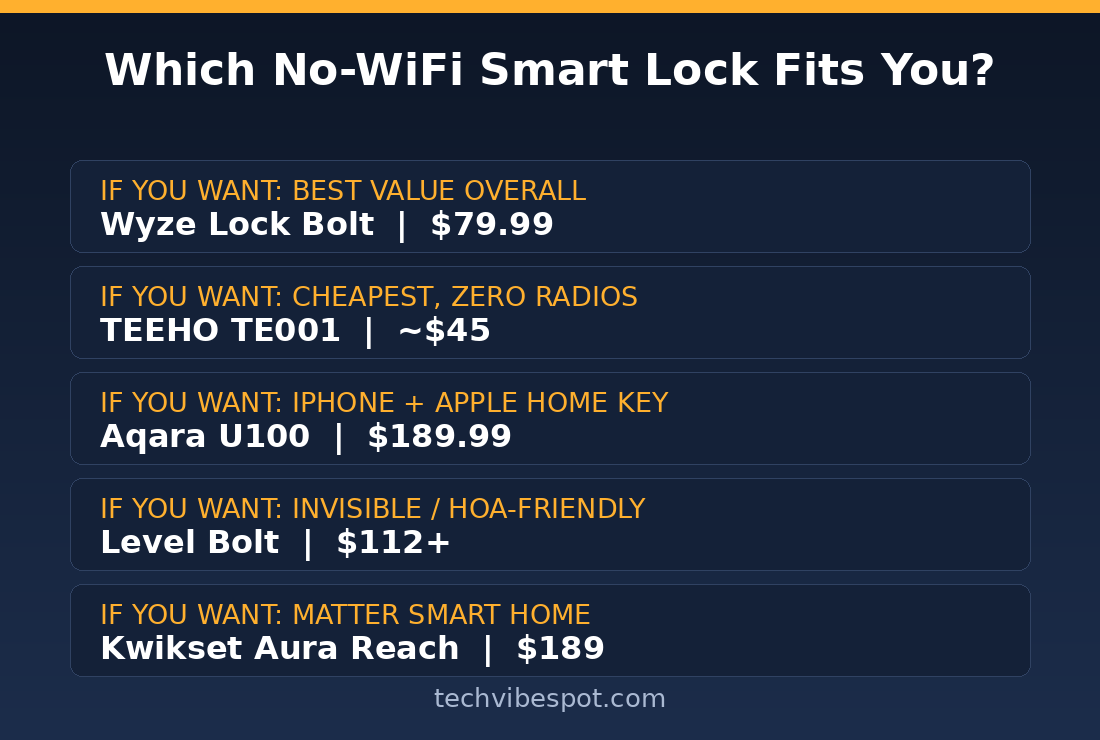
If you want maximum simplicity or minimum spend, get the TEEHO TE001. Around $45, no app, no radios, two backup keys, done. Grandparents can use it on day one.
If you carry an iPhone, get the Aqara U100. Home Key over NFC is the fastest, most reliable no-WiFi unlock method in the industry, and the fingerprint reader backs it up.
If your door must look dumb, get the Level Bolt. It is invisible from both sides, your existing keys keep working, and Matter-over-Thread adds smarts through a hub, not through WiFi.
If you want whole-home automation without a WiFi lock, get the Kwikset Aura Reach. Matter-over-Thread delivers remote access and every major voice assistant while the lock itself stays off your network.
Are Smart Locks Without WiFi More Secure?
Against remote attacks, yes, categorically. A lock that is not on the internet cannot be attacked from the internet: no stolen-password logins, no cloud-server breaches, no botched firmware pushed at 2 a.m. The TEEHO TE001 takes this to its logical end; with no radios of any kind, its entire attack surface is the physical lock and the keypad, and the anti-peep feature blunts the keypad’s one classic weakness. Bluetooth, Thread, and Zigbee locks do transmit, but pairing is encrypted and the short range means an attacker needs to be near your door, at which point a brick beats any exploit.
Physical security is a separate question, and here the certifications matter more than the radios. Every pick in this guide is at least ANSI Grade 3, the residential standard; pricier models climb toward Grade 2 hardware and BHMA certification like the Wyze Lock Bolt carries. One honest caveat: budget locks including the TEEHO use simple pin-tumbler keyways that a skilled picker can defeat, though the same is true of most builder-grade deadbolts already on American doors. The realistic takeaway is that a no-WiFi smart lock is more secure than a WiFi lock against digital threats and equally secure against a crowbar.
What Happens If the Battery Dies on a Non-WiFi Smart Lock?
You will almost never be surprised, because every lock here starts warning you weeks in advance with low-battery chirps, flashing indicators, and app alerts. But if you ignore all of it, each pick has a different fallback. The TEEHO TE001 and Aqara U100 include two physical backup keys; the U100 adds a USB-C port, so any phone charger or power bank revives the keypad in seconds. The Level Bolt keeps your door’s original keyway, so your existing house key simply works, dead battery or not. The Kwikset Aura Reach retains a traditional keyed cylinder. The Wyze Lock Bolt is the one exception with no keyway and no external power input, which makes battery discipline non-negotiable; to its credit, four AAs last about a year, and replacement takes two minutes with a screwdriver. Whatever you buy, set a calendar reminder to swap batteries annually and the fallback plans stay theoretical.
Verdict: The Best Smart Lock Without WiFi in 2026
The Wyze Lock Bolt wins this category. At $79.99 it delivers the two entry methods people actually use, fingerprint and keypad, plus auto-lock, a year of battery life, and app-managed codes, all with no WiFi, no hub, and no monthly fee. The TEEHO TE001 is the right call when the budget is $50 or the user hates apps; the Aqara U100 is the upgrade for iPhone households; the Level Bolt solves the invisibility problem nothing else can; and the Kwikset Aura Reach proves you can have a fully connected smart home while your deadbolt stays off the network. Not one of them will strand you when the internet dies, which is the whole point.
Check the Wyze Lock Bolt price on Amazon →
FAQ: Smart Locks Without WiFi
Do smart locks work without WiFi?
Yes. Locks with keypads, fingerprint readers, Bluetooth, Zigbee, or Thread store credentials locally and lock or unlock with no internet connection. WiFi is only required for remote control and real-time alerts, and hub-based locks can add those features later without a WiFi radio in the lock.
Can I control a non-WiFi smart lock with my phone?
Yes, over Bluetooth when you are within roughly 15 to 30 feet. The Wyze Lock Bolt, Aqara U100, Level Bolt, and Kwikset Aura Reach all pair with phone apps via Bluetooth for managing codes, reviewing logs, and locking the door. Only the TEEHO TE001 has no app at all.
What is the cheapest smart lock without WiFi?
The TEEHO TE001, at around $45. It is a pure offline keypad deadbolt with 20 user codes, auto-lock, ANSI Grade 3 certification, and two backup keys. The cheapest option with fingerprint entry and app support is the Wyze Lock Bolt at $79.99.
Do smart locks without WiFi work with Alexa or Google Home?
Some do, through a hub instead of WiFi. The Kwikset Aura Reach and Level Bolt use Matter-over-Thread, so any Thread border router (newer Echo, Nest hub, HomePod mini, Apple TV 4K) connects them to Alexa, Google Home, and Apple Home. The Aqara U100 does the same through an Aqara Zigbee hub.
Are Bluetooth smart locks safe?
Yes, for practical purposes. Bluetooth pairing on current locks is encrypted, and the 15-to-30-foot range means any attacker must already be standing at your door. Unlike WiFi locks, Bluetooth-only models cannot be attacked over the internet, which removes the most scalable threat entirely.
How long do batteries last in a non-WiFi smart lock?
Eight to twelve months is typical. The Wyze Lock Bolt runs up to 12 months on four AAs, the Aqara U100 about 8 months, and the Level Bolt about a year on one CR2 cell. WiFi locks, by comparison, often need new batteries every 2 to 4 months because the WiFi radio drains constantly.
What happens if the power goes out?
Nothing changes. These locks are battery-powered and store credentials internally, so fingerprints, codes, and keys keep working through any blackout. A power outage only affects hub-dependent extras like remote access, and only until the hub comes back online.
Can a smart lock without WiFi still log who enters?
Yes, if it has Bluetooth. The Wyze Lock Bolt and Aqara U100 record every unlock with a timestamp and the code or fingerprint used; the log syncs to your phone the next time you are in Bluetooth range. The app-free TEEHO TE001 keeps no log.
Sources: SafeHome.org Wyze Lock Bolt review • Aqara U100 official specifications • Tom’s Guide Level Bolt review • TEEHO official product documentation. Prices checked July 29, 2026; check current prices via the buttons above, as Amazon pricing changes daily.