TechVibeSpot earns a commission if you buy through links on this page. That never changes a verdict.
You don’t need $200 and a Wi-Fi bridge to stop carrying house keys. A keypad deadbolt replaces your existing deadbolt in about 20 minutes with a screwdriver, runs a year on AA batteries, and lets you hand out codes instead of copies of your key. The under-$100 bracket is where the real value sits in 2026, and after comparing current prices, spec sheets, and hundreds of owner reviews across five locks, one clear ranking emerged.
How we assess: this guide is based on official documentation/manufacturer specs, pricing pages, and verified user/owner reports, not hands-on testing.
What is the best keypad deadbolt under $100? The TEEHO TE001 is the best keypad deadbolt under $100 for most doors. It costs $40-$57, stores 20 user codes plus one-time guest codes, runs a year on four AA batteries, and includes two backup keys. Pick the Wyze Lock Bolt if you want a fingerprint reader, or the Kwikset SmartCode 270 for big-brand hardware.
Quick picks: the three worth your money
Best overall + best budget: TEEHO TE001 — for anyone who wants keyless entry at the lowest price that isn’t junk. Amazon’s #1 best-selling deadbolt, typically $40-$57.
Best fingerprint: Wyze Lock Bolt — for households that want one-touch entry instead of typing codes. Fingerprint + keypad for about $70.
Best big-brand pick: Kwikset SmartCode 270 — for buyers who want a Grade 2 rated lock, 50 codes, and a rekeyable key cylinder from a century-old lock company. Usually $85-$100.
Key takeaways
- The TEEHO TE001 ($40-$57) is the best value: 20 codes, one-time guest codes, IP54 weather rating, two backup keys, and a one-year battery life.
- The Wyze Lock Bolt (~$70) is the only lock under $100 with a reliable fingerprint reader, but it has no physical keyhole — backup is a USB-C port.
- The Kwikset SmartCode 270 ($85-$100) is the only ANSI Grade 2 lock here, with 50 user codes and SmartKey rekeying.
- None of these locks need Wi-Fi or a subscription. Codes are stored in the lock itself and keep working during internet and power outages.
- All five install with a Phillips screwdriver on a standard US deadbolt bore (2-1/8 inch) in 15-30 minutes.
What Is the Best Keypad Deadbolt Under $100?
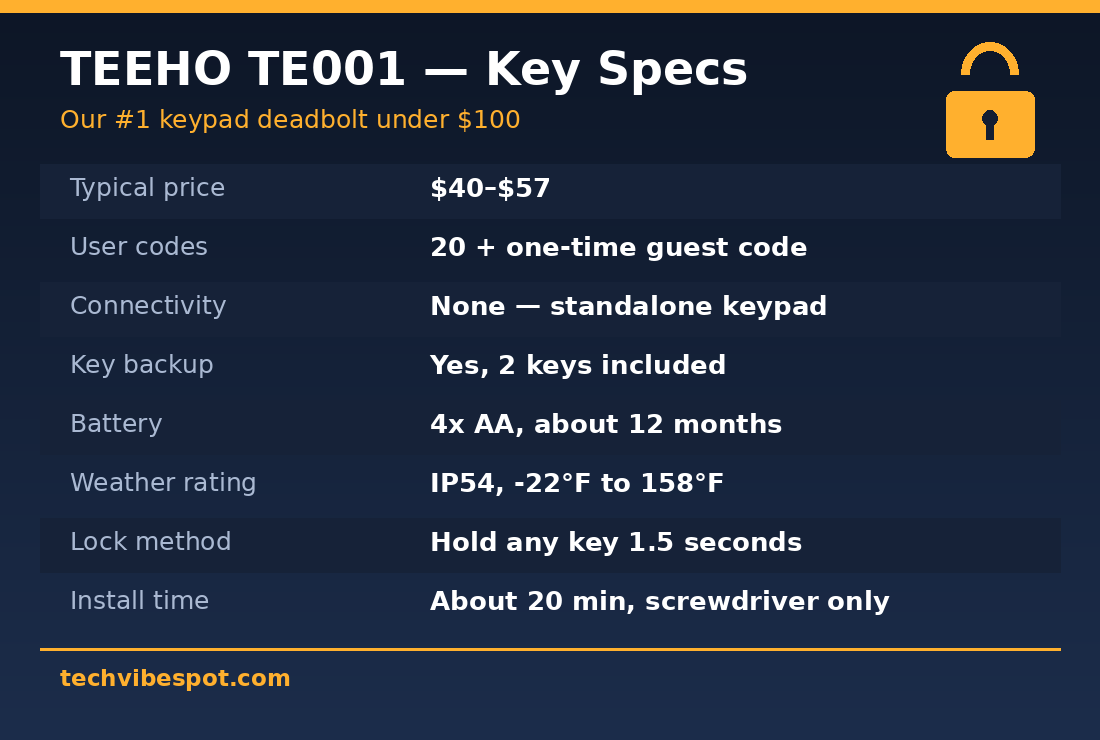
The best keypad deadbolt under $100 is the TEEHO TE001, because it does everything a code lock must do (reliable motorized bolt, easy code management, weather resistance, key backup) at roughly half the price of the Kwikset SmartCode 270. TEEHO lists the TE001 at $56.99, and the satin nickel version regularly sells on Amazon for less than $45. That price buys 20 programmable user codes, a one-time code that deletes itself after a single use, an IP54 keypad rated for -22°F to 158°F, and a 12-month warranty.
Value is the whole argument here, so be clear about what the TE001 does not do. It has no app, no Wi-Fi, no Bluetooth, and no fingerprint reader. You program it entirely from the keypad, the way people programmed garage codes for decades. For a front door, a rental, a garage entry door, or an aging parent’s house, that simplicity is a feature: there is nothing to pair, nothing to update, and nothing to disconnect. If you specifically want app control under $100, the eufy C220 below is the stretch pick, and our best smart locks for Airbnb guide covers remote-code scenarios in depth.
The TE001’s sales rank backs this up: it has been Amazon’s best-selling door deadbolt for most of the past three years, with a rating around 4.5 stars across tens of thousands of reviews. Owners consistently praise the 20-minute installation. The most common complaint is that auto-lock is not automatic in the usual sense: you long-press any key for about 1.5 seconds to throw the bolt as you leave. If you want true hands-free auto-locking on a timer, the Wyze Lock Bolt and Kwikset 270 both do it.
How Do These Five Locks Compare?
Five keypad deadbolts are worth buying under $100 in July 2026: the TEEHO TE001, Wyze Lock Bolt, Kwikset SmartCode 270, Kwikset SmartCode 260, and eufy Security C220. The table below shows the differences that actually change the buying decision: what you pay, how it connects, and what happens if the electronics fail.
| Lock | Typical price | Connectivity | Key backup | Best for | |
|---|---|---|---|---|---|
| TEEHO TE001 | $40-$57 | None (standalone keypad) | Yes, 2 keys included | Best value for most doors | Check price |
| Wyze Lock Bolt | $55-$70 | Bluetooth + app | No keyhole (USB-C power backup) | Fingerprint entry on a budget | Check price |
| Kwikset SmartCode 270 | $85-$100 | None (standalone keypad) | Yes, SmartKey rekeyable | Grade 2 security, 50 codes | Check price |
| Kwikset SmartCode 260 | $60-$80 | None (standalone keypad) | Yes, SmartKey rekeyable | Kwikset quality, lower price | Check price |
| eufy Security C220 | $90-$130 (watch for sales) | Built-in Wi-Fi + fingerprint | Yes, keyhole included | App + remote control when discounted | Check price |
Read the key-backup column twice. The Wyze Lock Bolt is the only lock here with no physical keyway at all: if the batteries die, you hold a USB-C power bank against the port to wake it up. Some buyers love that (no cylinder to pick or bump), others find it a dealbreaker. If a physical key is non-negotiable, buy the TEEHO, either Kwikset, or the eufy. We break down that trade-off further in our TEEHO TE001 vs Wyze Lock Bolt head-to-head.
TEEHO TE001 Review: Why the Cheapest Pick Wins
The TEEHO TE001 wins this roundup because it is the lowest-priced lock that gets every fundamental right. The TE001 is a motorized single-cylinder deadbolt with a backlit rubber-button keypad, sold in satin nickel, matte black, and oil-rubbed bronze. TEEHO’s spec sheet lists 20 user codes, a self-deleting one-time code for deliveries or cleaners, an IP54 dust and splash rating, and operation from -22°F to 158°F. Cold-climate owners in Minnesota and Alberta report it keeps working through winters that kill touchscreen locks. Four AA batteries last about a year, and a low-battery warning starts at 15% so you get weeks of notice.
Installation is the TE001’s quiet superpower. It fits a standard 2-1/8 inch bore hole with an adjustable backset, needs only a Phillips screwdriver, and the majority of owner reviews mention finishing in under half an hour. There is no app pairing step because there is no app. Program codes with the master code, hand the spare keys to family, done.
Buy the TEEHO TE001 if: you want keyless entry for the price of a pizza night, you’re outfitting a rental or a back door, you’re buying for someone who will never install an app, or you want a physical key backup in a drawer somewhere.
Skip it if: you want hands-free auto-lock on a timer (it locks via a 1.5-second key press), fingerprint entry, or any remote control. And if you’ve seen reports about the TE001 not locking, they almost always trace to a misaligned strike plate during install, not the motor. It is a 10-minute fix with a chisel.
Wyze Lock Bolt Review: Fingerprint Entry for $70
The Wyze Lock Bolt is the cheapest deadbolt with a fingerprint reader that reviewers actually trust. PCWorld called it “a phenomenal value” and highlighted that the reader, mounted at the top of the keypad, stores prints for up to 20 users and unlocks in under a second. For most families, fingerprint beats codes: kids don’t forget fingers, and nobody shoulder-surfs a fingerprint. It lists at $69.99 and routinely dips to the mid-$50s.
The Bolt is Bluetooth-only, which cuts both ways. You get an app for managing users, viewing an entry log, and setting schedules while you’re within range, but no remote unlocking from work, and no Alexa or Google control. (Wyze now sells an Auto-Lock Bolt v2 with Wi-Fi that has sold as low as $30 during Prime events, arguably the best flash-sale lock deal in the category.) The original Bolt’s party trick is its auto-expiring one-time codes, which regenerate every four hours, so you can read one out to a plumber over the phone without ever creating an account for them.
Two honest caveats from owner feedback. First, there is no keyhole; the backup plan is a USB-C port that accepts power from any phone charger or power bank, and Wyze’s four-AA battery life is long enough that running dry takes real neglect. Second, a minority of owners report the fingerprint reader getting sluggish in rain or with wet hands. That is normal for optical readers at this price, and the keypad always works as fallback.
Buy the Wyze Lock Bolt if: you want the fastest daily entry under $100, you like an app-based log of who came home when, or you’re upgrading from codes the whole neighborhood knows.
Skip it if: you require a physical key, want voice-assistant control (see our smart locks that work with Alexa guide), or your door gets heavy driving rain with no overhang.
Kwikset SmartCode 270 Review: The Big-Brand Grade 2 Pick
The Kwikset SmartCode 270 is the lock to buy when you want a hundred-year-old lock brand instead of a young import label. It is ANSI Grade 2 rated (the only lock in this roundup that is) with a UL 20-minute fire rating, 50 programmable user codes, one-touch locking, and Kwikset’s SmartKey cylinder, which lets you rekey the lock to your existing Kwikset (KW1) house key in seconds with a small tool. SmartKey also resists picking and bumping better than a standard pin cylinder.
The 270 is a standalone electronic deadbolt: no app, no radio, nothing to hack remotely. Codes are programmed at the keypad and stored in the lock. It runs on four AA batteries, and the capacitive-style touchpad is glove-unfriendly but glows clearly at night. Street price floats between $85 and $100 depending on finish; the matte black contemporary version has dropped to $87 on sale. That makes it the most expensive lock here, and worth it specifically for the Grade 2 hardware and the 50-code capacity that landlords and larger households actually use.
If the 270 stretches the budget, the Kwikset SmartCode 260 (linked in the table above) is the same idea with physical push buttons instead of a touchpad, fewer codes, and a $60-$80 price. The buttons work with gloves, which cold-state readers keep pointing out in reviews. Kwikset’s smart flagships, the Halo Touch and the new Aura Reach we covered in our Kwikset Aura Reach review, start well north of $150, so the 260/270 pair is how you get Kwikset build quality without paying for radios you may not want.
Buy the SmartCode 270 if: you want the strongest rated hardware under $100, 50 codes, a rekeyable key backup, and zero connectivity by design.
Skip it if: price matters more than the badge (the TEEHO does 80% of this for half), or you want any app features at all.
eufy Security C220 Review: The Wi-Fi Stretch Pick
The eufy Security C220 is the lock to watch if you want built-in Wi-Fi, a fingerprint reader, a keypad, and a physical key in one unit — five ways in, no hub required. It is BHMA certified, IP53 rated, and eufy claims eight months of battery life, which owner reviews on Home Depot broadly support. The catch is price honesty: the C220 lists between $99 and $130 depending on finish and bundle, so it only belongs in an under-$100 article because it spends a lot of the year on sale below that line. When it drops to $80-$95, which happened repeatedly through 2025 and 2026, it is the cheapest genuinely smart deadbolt worth owning, with remote unlock, real-time notifications, and no subscription.
Against the premium field, the C220 gives up polish, not function. Locks like the Lockly Affirm we reviewed in our Lockly Affirm smart lock review add fancier readers and displays for twice the money. If your goal is remote access on the tightest possible budget, set a price alert on the C220 and buy the dip.
Buy the eufy C220 if: you catch it under $100 and want app control, fingerprint, keypad, and key backup in one lock.
Skip it if: it’s selling at full list price, or you don’t actually need remote access — a standalone keypad is simpler and cheaper.
Are Keypad Deadbolts Safe Enough for a Front Door?
Yes. A keypad deadbolt under $100 is at least as safe as the plain deadbolt it replaces, and in several ways safer. The bolt itself is the same hardened steel throwing into the same strike plate; what changes is the credential. Codes remove the two most common real-world failure points of keyed locks: keys hidden under mats and copies you can’t take back from an ex-roommate or a former cleaner. Security writers at Angi make the same point: the main risks of keypad locks are code-sharing sloppiness and worn-button patterns, both of which you control by rotating codes a couple of times a year.
Grades matter more than electronics. The Kwikset 270’s ANSI Grade 2 rating certifies it survived more bolt-strike and torque abuse in testing than a typical Grade 3 residential lock like the TEEHO or eufy. But every lock in this list is only as strong as your door frame. A $2 pack of 3-inch strike-plate screws driven into the stud upgrades any of them more than another $50 of lock ever will. On glass-panel doors, remember that no deadbolt defeats a smashed pane and a reached-through thumb turn; a double-cylinder or a different door is the fix there, not a better keypad.
One more overlooked point: standalone keypads (TEEHO, both Kwiksets) have no radio, so their attack surface is entirely physical. Nobody phishes a lock that has no network.
What Happens When the Batteries Die?
Nothing dramatic. Every lock here warns you for weeks, and every lock here has a backup path. The TEEHO TE001 starts flashing a low-battery warning at 15% charge, weeks before failure at its roughly one-year battery life, and includes two physical keys. Both Kwiksets take a standard KW1 key. The eufy C220 has a hidden keyway. The Wyze Lock Bolt is the outlier: no keyhole, so its dead-battery plan is a USB-C port on the underside: touch any power bank or phone charger to it and the keypad wakes instantly.
All five run on four AA batteries you can buy at a gas station, not proprietary packs. Realistic battery life across owner reports: about 12 months for the TEEHO and the Kwiksets, 8-12 months for the Wyze, and around 8 months for the eufy (Wi-Fi radios eat batteries, the one real tax of the smart pick). Cold weather shortens all of these figures; alkaline cells sag below freezing, so northern owners often switch to lithium AAs each fall.
Do You Need Wi-Fi on a Keypad Deadbolt?
No, and for most buyers skipping Wi-Fi is the smarter call under $100. Codes live in the lock’s own memory on every model in this list, so entry keeps working through internet outages, router swaps, and power cuts. Wi-Fi adds exactly three things: unlocking remotely, creating codes remotely, and getting notifications. If you never rent your place or let workers in while you’re away, those features go unused while their costs (shorter battery life, app accounts, firmware updates) arrive on day one.
The decision rule is simple. If you’re a homeowner who wants to stop carrying keys, get the TEEHO TE001 and spend the savings on strike-plate screws. If you’re a frequent Airbnb host or manage a rental from another city, you need remote code creation — get the eufy C220 on sale, or step up to the dedicated hosting locks in our Airbnb smart lock guide. If you’re in between, wanting an entry log and schedules but not remote access, the Bluetooth Wyze Lock Bolt is the exact middle ground.
How Hard Is Installation, Really?
Every lock in this roundup installs with one Phillips screwdriver in 15-30 minutes if your door already has a deadbolt. All five fit the standard US prep: a 2-1/8 inch bore hole, a 1-inch edge bore, and an adjustable 2-3/8 or 2-3/4 inch backset. The process is the same for all of them: unscrew the old deadbolt, slide in the new bolt, sandwich the door between the keypad and interior assembly, connect one cable, load batteries, set your master code.
The single mistake that generates most one-star reviews across every brand: a bolt that binds because the door sags or the strike-plate hole is shallow. Test with the door open first. If the bolt throws smoothly open but binds closed, the strike plate needs adjusting. That’s the door’s fault, not the lock’s, and it is also the root cause behind most “TEEHO not locking” and “auto-lock failed” complaints on Amazon for every brand in this class. Motorized locks can’t force a misaligned bolt the way your wrist can.
Verdict: Which Keypad Deadbolt Should You Buy?
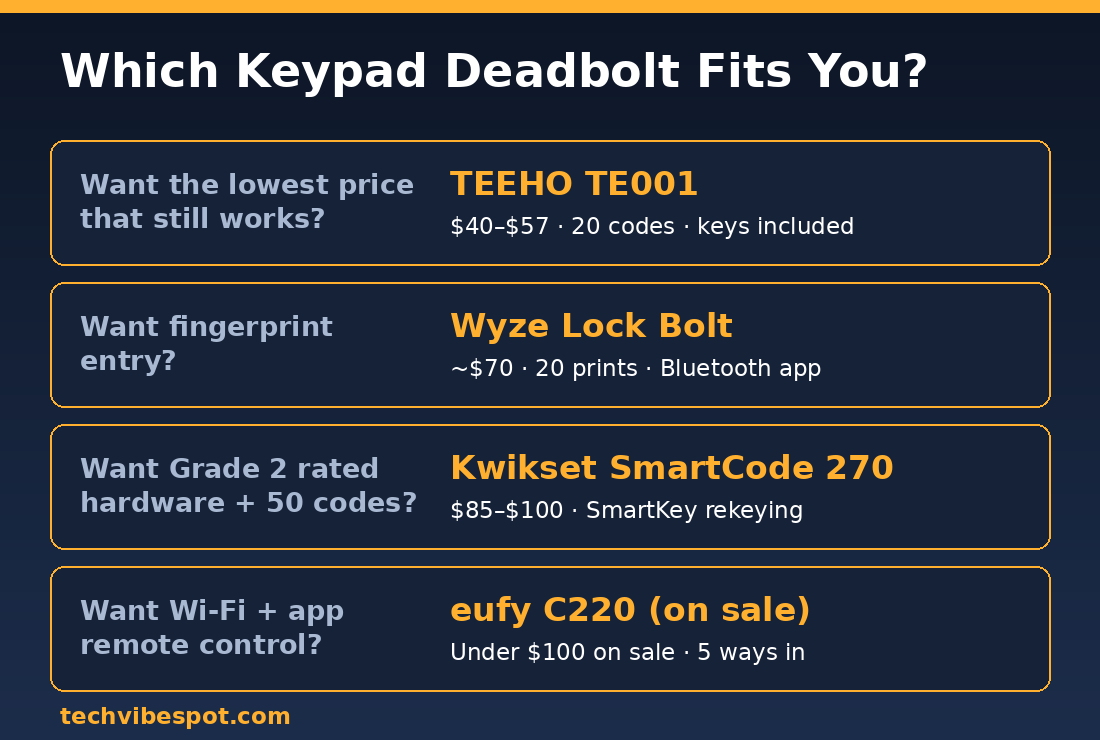
Buy the TEEHO TE001. For $40-$57 it covers what 90% of buyers need from a keypad deadbolt: reliable code entry, guest codes, weather resistance, key backup, year-long battery life, and a 20-minute install. The Wyze Lock Bolt earns the fingerprint upgrade at $70 if typing codes annoys you, and the Kwikset SmartCode 270 is the right spend for landlords and anyone who wants Grade 2 hardware with 50 codes. The eufy C220 is the opportunistic buy: a real Wi-Fi smart lock whenever it dips under $100.
Prices in this bracket move weekly, and all three top picks see regular coupons.
Check today’s TEEHO TE001 price on Amazon →
FAQ: Keypad Deadbolts Under $100
Can a keypad deadbolt be picked?
Only through its backup keyway, if it has one. The TEEHO and eufy use standard cylinders; both Kwiksets use SmartKey cylinders designed to resist picking and bumping. The Wyze Lock Bolt has no keyway at all, so there is nothing to pick — its keypad also disables temporarily after repeated wrong codes.
Do keypad deadbolts work in extreme cold?
Yes, within rated limits. The TEEHO TE001 is rated to -22°F, and its physical rubber buttons outperform touchscreens in frost. Swap alkaline AAs for lithium AAs below freezing, since alkaline voltage sags in cold and triggers early low-battery warnings.
What code length is safest?
Use 6-8 digits where the lock allows it, avoid birthdays and repeats, and rotate codes twice a year. Give guests and workers their own codes; the TEEHO’s one-time code and the Wyze’s four-hour expiring codes exist exactly for this, so you never share your master code.
Will these locks fit my door?
If a standard US deadbolt fits your door today, all five fit: 2-1/8 inch bore, adjustable 2-3/8 to 2-3/4 inch backset, doors 1-3/8 to 1-3/4 inches thick. Thicker custom doors may need an extension kit from the manufacturer.
Do any of these require a subscription?
No. All five store codes locally and charge nothing monthly. The Wyze and eufy apps are free; optional Wyze Cam Plus subscriptions relate to cameras, not the lock.
Which lock is best for a rental property?
The Kwikset SmartCode 270 for long-term rentals — 50 codes and SmartKey rekeying between tenants takes seconds and costs nothing. For short-term rentals where you create codes remotely, choose the eufy C220 or a dedicated hosting lock.
Is the TEEHO TE001 auto-lock really automatic?
Not by default in the timer sense. You long-press any key for about 1.5 seconds as you leave and the bolt throws. The Wyze Lock Bolt and Kwikset 270 both offer true timed auto-locking if hands-free is a must.
Keypad deadbolt vs smart lock — what’s the actual difference?
A keypad deadbolt stores codes in the lock with no connectivity; a smart lock adds Bluetooth or Wi-Fi for app control. Under $100, keypad-only models (TEEHO, Kwikset 260/270) buy you better hardware per dollar, while connected models (Wyze, eufy) trade some battery life for convenience features.
Prices checked July 22, 2026. Sources: PCWorld’s Wyze Lock Bolt review, Kwikset SmartCode 270 official specs, TEEHO TE001 official product page, Angi on keyless lock safety, and aggregated owner reviews on Amazon, Home Depot, and Best Buy. TechVibeSpot compiles research from manufacturer documentation, professional reviews, and verified owner feedback; we clearly label when conclusions are research-based rather than hands-on.